
Introduction
What is Single Sign-On?
Single sign-on (SSO) is a software authentication method which enables an end-user to login to one application with a single set of credentials and for this to automatically log them into a number of other distinct but associated ('federated') applications. SSO is becoming increasingly popular for both commercial and consumer applications as it results in a significant reduction in time users spend managing their credentials ('password fatigue') and IT helpdesk calls due to lost/forgotten/compromised credentials, resulting in greater productivity in the commercial sphere and a better overall software experience for all types of users.
SSO brings many other advantages to the (independent) software vendor (ISV), including better network security (users requiring fewer credentials and thus having less temptation to store them insecurely e.g. in written notes or plain text files), a reduced attack surface and consolidation of administrative effort that encourages specialization and use of best practices.
Zentitle Licensing with SSO
Zentitle Software Licensing has an existing provision for Account-Based Licensing (ABL) for both on-premise and web-based applications based on simple verification of a set of login credentials held on the Zentitle licensing server. Here, the same login is used for both authentication (validation of user credentials) and authorization (license activation/refresh giving access to current user entitlements.) In what follows, we shall use the terms authorization and activation interchangeably.
In the standard ABL software access model, the authentication and authorization steps are effectively combined into a single user login action. By contrast, Zentitle licensing with SSO separates these concerns into authentication, with credentials being held on a third-party identity provider (IDP) instead of on the Zentitle server, and authorization, the responsibility for which is retained by the Zentitle server.
Transfer of the authentication role away from the Zentitle licensing server to a third-party server enables the same set of credentials stored on this server to be used for multiple, unrelated applications, each of which will, through its own authorization process, grant the user access to the application-specific functionality to which they are entitled. It is then possible for a Zentitle-licensed application to be federated, in the above sense, and to therefore take advantage of the benefits of SSO as described above.
SSO With Zentitle
General Considerations
A general SSO authentication scheme consists of transactions involving the following three types of participant:
- Service Providers, normally web-based providers of some service to be consumed. Here we will be interested principally in Zentitle Licensing as the service provider which grants access to various kinds of software according to various licensing models.
- End-users, i.e. the consumers of the available services, here the software whose licensing is managed by Zentitle.
- Identity Providers (IDP), trusted entities whose role is to authenticate the end-user on behalf of service providers which may then grant them access to their permitted entitlements, here software licensing entitlements defined within Zentitle. Zentitle SSO currently supports select IDPs which make use of the OpenIDConnect protocol for end-user authentication. This holds whether authentication takes place on a remote third-party authentication server (e.g. PingIdentity or Auth0) or locally at the end-user site (e.g. using LDAP or Microsoft Active Directory.)
Preparatory Steps
Your organization, the independent software vendor (ISV), is not directly involved in the authentication process. It is, however, your responsibility to initially setup your users on your IDP of choice and to become familiar with authentication using this IDP.
It is assumed, except where explicitly stated, that you will be using account-based licensing (ABL.) The possibility of SSO using license codes explicitly is considered at the end of this document.
You will be required to specify login credentials (a username and password) for each user on the IDP. We shall refer to these as the SSO credentials. For each user, the same username should be used in the SSO credentials as in the ABL ones. When setting up a user's ABL credentials in Zentitle, if the user is to be authenticated exclusively by SSO, then only the SSO password will be used as authentication will always be managed by the IDP. It will still however be necessary to supply an ABL password when creating the user's account on Zentitle. This password will not be used during SSO authentication. It will, however, be used for non-SSO ABL authentication.
On successful SSO authentication, the ABL username is returned from the IDP as part of an 'identity token' (see 'The Identity Token' below.)
SSO Scenarios
Here we consider the two SSO scenarios for Zentitle licensing, corresponding to the two possible application types ('On Premise' and 'SaaS' i.e. a web-based application providing 'Software as a Service'.) These are laid out in the table below.
| On Premise: client application running natively on fixed hardware with Zentitle library. | SaaS: a web-based application | |
| ABL Authorization: uses Account-Based Licensing (ABL) user credentials. | On Premise ABL | SaaS ABL |
The general flow of the authentication/authorization process is depicted in the diagram below. Specific details will depend on which of the above scenarios applies and will be described more extensively below.
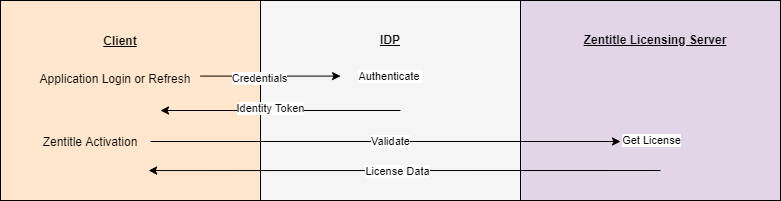
This process consists of the following steps:
- Authentication: The client (On-Premise or SaaS application) is required to authenticate with the IDP. This will involve it opening up a login page on the IDP where the end-user is required to enter their IDP credentials. Successful authentication will occur if the entered credentials match a set of credentials stored in the IDP. It will result in the next step, which is the return of an identity token to the client. If the authentication is unsuccessful, then the user will be informed of this failure on the login page and will be unable to proceed further.
- Receipt of Identity Token: The identity token contains information required by Zentitle to carry out the software activation/refresh process.
- Validation/Activation: Data obtained from the identity token is passed and used to perform the activation/refresh procedure using similar steps/function calls to those which apply in the corresponding non-SSO scenario. In the On Premise ABL scenario this requires prior validation of the identity token by the IDP - more details below.
- Receipt of License Data: On successful activation, the client updates its local license information with the license configuration data obtained from the Zentitle licensing server.
The Identity Token
Formally, the identity token is a JSON Web Token (JWT) containing information required by Zentitle to carry out the software authorization process. This token will conform to the JWT OpenID specification. This specification may be found at https://openid.net/specs/draft-jones-json-web-token-07.html.
The identity token will be returned as a base-64 JSON object. Such items can be conveniently decoded at JSON Web Tokens - jwt.io. Although all JWTs conform to a fixed, general standard, this standard is highly-flexible and identity tokens from different IDPs may exhibit structural variation. For example, the following shows an identity token returned by Auth0:
Header
{
"alg": "RS256",
"typ": "JWT",
"kid": "NjU4OTdBMzZGNzFDQ0JCQ0Q2NDQ4NDU5MUM4ODI2OEM2MUFDOEM1Ng"
}
Payload
{
"nickname": "rufus",
"name": "rufus@yahoo.co.uk",
"picture": "https://s.gravatar.com/avatar/9d57aea7dfb036d5af0778e8b6293ed0?s=480&r=pg&d=https://cdn.auth0.com/avatars/ri.png",
"updated_at": "2021-05-04T16:42:46.780Z",
"iss": "https://nalpeiron.eu.auth0.com/",
"sub": "auth0|608945e0a581130071616166",
"aud": "MK8dpgAJuZXMCkjfdROqGu9RVqX5nOhY",
"iat": 1620146568,
"exp": 1620146578,
"nonce": "2fe45f93c401a776fde71ece29c05957"
}
Here, the "name" field would be the natural choice as the username and "exp" the expiry date in UNIX epoch time..
On Premise Licensing
On Premise-Type SSO
The On Premise, Account-Based Licensing scenario is depicted in the diagram below:
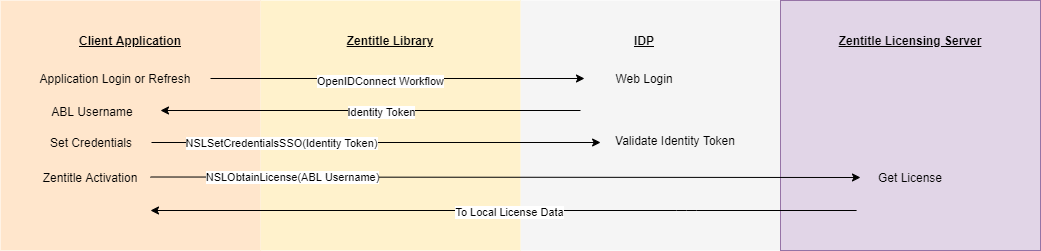
The authentication/authorization procedure consists of the following series of steps:
- Connect to IDP: The Client Application will launch the IDP login page in a browser window whilst establishing an OpenIDConnect link with the IDP. The user is required to enter their IDP credentials in this login page (username/password) which are validated by the IDP against those stored in its database. If the authentication is successful, then the IDP will return the identity token for this user to the client application.
- Obtain Username: The ABL Username is obtained from the identity token.
- Validation: The Client API function NSLSetCredentialsSSO is called which validates the received identity token against that stored in the IDP. The token expiry date is returned by this function call.
- Activation: The Client API function NSLObtainLicense is called, passing the ABL Username to the Zentitle Licensing Server, to complete the license activation procedure. The updated license information is passed back to the client to be stored in its local license cache.
Client API Functions
As mentioned above, there are two client API functions involved in authentication/activation via SSO: NSLSetCredentialsSSO and NSLObtainLicense. The former, NSLSetCredentialsSSO, is a function exclusive to the SSO use case. It is a variant of the NSLSetCredentials function used in non-SSO ABL, having the following signature:
int NSLSetCredentialsSSO(const unsigned char *token, uint64_t *ssoExpDate, char *inData);
where
token: A valid NULL terminated identity token (JWT) presented as a string.  The identity token
will be validated before being used as an authentication source. The standard identity token
validation method is used which will require access to the IDP for identity token information.
A local IDP may be used.

ssoExpDate: The expiration date of token in epoch seconds (number of seconds since midnight
Jan 1 1970.) This value will always be returned initially when the token is passed into the
function.  The expiration date of an existing token will be returned if token=NULL.

inData:  not used at this time. Should be set to NULL by the caller to ensure future
compatibility.

@return = 0: If the call succeeded.
@return < 0: A negative error value is returned.
The latter function NSLObtainLicense is simply the familiar main activation function which is also used in non-SSO licensing, and it is used in exactly the same way, i.e. for non-ABL licensing, the license code is passed in as the authentication parameter while in ABL licensing, the ABL username is passed in instead.
Concerning Validation of the Identity Token: During the validation of this identity token, the library must contact the IDP responsible for authentication using TLS. Validating the TLS connection requires a valid certificate bundle to be present and available on the end user's system. The library will use the standard methods of accessing this bundle. Should they fail, you may place your own certificate bundle in the library's WorkDir. Generally, such a failure is caused by an invalid or non-standard certificate bundle and will be indicated by a -4460 return from the NSLSetCredentialsSSO call.
If you encounter such a situation, you may provide the library with a certificate bundle. This feature must be enabled when you create the library by checking the "Custom Certificate Bundle" checkbox. The bundle should be placed in the library's WorkDir and named in the same manner as the other files there but with a .pem extension. For instance, if your license file is ce41f5a106b7dc878f.lic then the certificate bundle should be renamed as ce41f5a106b7dc878f.pem. With this option enabled and the certificate bundle in place, if the library fails to validate the TLS connection with the system's certificates, it will fall back on the certificates you provide in the WorkDir.
SaaS Licensing
By SaaS application, we refer to a web application running on a webserver which is completely under your control. Unlike in On-Premise licensing, verification of the identity token in a SaaS application is not required by Zentitle unlike in the On Premise scenario. This is not necessary in SaaS applications because web apps don't operate in hostile environment.
Activation of the SaaS application is carried out by making a call to the POST SaaSLicensing REST API call described here.
SaaS-Type SSO
The SaaS, Account-Based Licensing scenario is depicted in the diagram below:
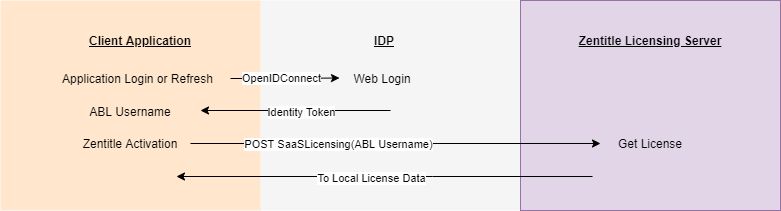
The authentication/authorization procedure consists of the following series of steps:
- Connect to IDP: The SaaS application will launch/redirect to the IDP login page in a browser window whilst establishing an OpenIDConnect link with the IDP. The user is required to enter their IDP credentials in this login page (username/password) which are validated by the IDP against those stored in its database. If the authentication is successful, then the IDP will return the identity token for this user to the client application.
- Obtain Username: The ABL Username is obtained from the identity token.
- Activation: The POST SaaSLicensing API function is called, passing the ABL Username to the Zentitle Licensing Server as the license code, to complete the license activation procedure. In this function call, authType should be set to "SSO". The updated license information is passed back to the client to be stored in its local license cache.
Advanced Topic: SSO with a License Code
In the foregoing, we have assumed that user authentication is carried out using login credentials, i.e. for the underlying licensing model to be ABL. It is, however, also possible to perform SSO authentication using a license code instead.
In such a model, the user would login as before using SSO credentials. However, in addition to the identity token, the IDP would be configured to return the license code. The user could then use this license code to access their software entitlements.
Here, the license code would not be returned in the identity token. Instead, it would be necessary to make use of custom claims to perform this task - if these are supported by your IDP. Custom claims are additional metadata in the form JSON key-value pairs which may be customised to various usage scenarios, one of which being to return the license code in this manner.
On Premise-Type SSO with a License Code
The On Premise, standard licensing scenario is depicted in the diagram below:
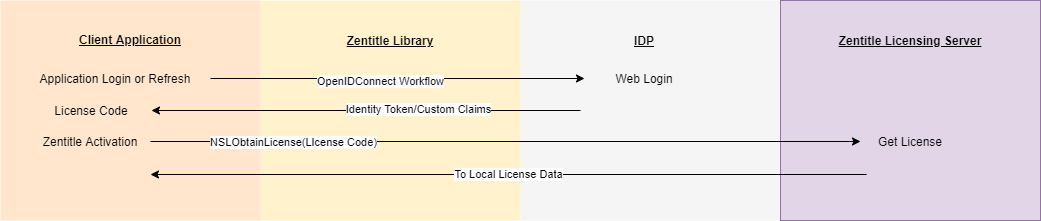
The authentication/authorization procedure consists of the following series of steps:
- Connect to IDP: The Client Application will launch the IDP login page in a browser window whilst establishing an OpenIDConnect link with the IDP. The user is required to enter their IDP credentials in this login page (username/password) which are validated by the IDP against those stored in its database. If the authentication is successful, then the IDP will return the identity token and custom claims for this user to the client application.
- Obtain License Code: The license code is obtained from the custom claims.
- Activation: The Client API function NSLObtainLicense is called, passing the license code to the Zentitle Licensing Server, to complete the license activation procedure. The updated license information is passed back to the client to be stored in its local license cache.
SaaS-Type SSO with a License Code
For SaaS licensing (i.e. a web application running on a webserver which is completely under your control) the SSO scenario is depicted in the diagram below:
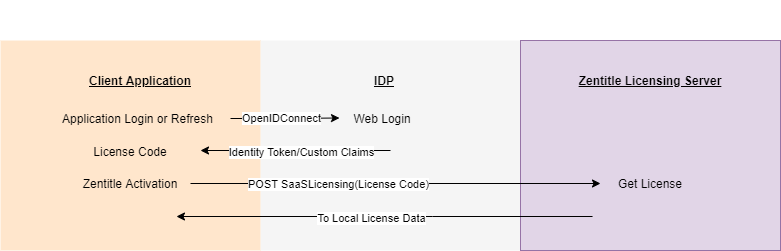
The authentication/authorization procedure consists of the following series of steps:
- Connect to IDP: The SaaS application will launch/redirect to the IDP login page in a browser window whilst establishing an OpenIDConnect link with the IDP. The user is required to enter their IDP credentials in this login page (username/password) which are validated by the IDP against those stored in its database. If the authentication is successful, then the IDP will return the identity token and custom claims for this user to the client application.
- Obtain License Code: The license code is obtained from the custom claims.
- Activation: The POST SaaSLicensing API function is called, passing the license code to the Zentitle Licensing Server, to complete the license activation procedure. The authType in this function call should be set to "". The updated license information is passed back to the client to be stored in its local license cache.