
Credential Management on the Client
The key difference between account-based licensing and standard (i.e. device-based) licensing is that there is no license code on the client side. Instead, the license code is associated with a group on the Zentitle server. The activation process consists of checking the suitability of this license code for activation on the Zentitle server, and also authentication of the supplied user credentials.
Zentitle's built-in trial functionality can't be used with account-based licensing. If you require the ability to offer trial licenses, we recommend you set aside a set of license codes, possibly in a designated license code profile, for this purpose.
User credentials are defined on the Zentitle server and associated with account groups, as are license codes. See here for details. The user credentials supplied by the client must match those on the server for the product code specified by the application; there must be a viable license code for the specified client product on the Zentitle server which is associated with the same account group as the supplied credentials.
Before attempting to acquire a license from the server, your application should set and authenticate the credentials of a user. This authentication may take place on the Zentitle server. Alternatively, it can occur on a third-party server, with the enhanced security option of two-factor authentication with Zentitle. These three authentication options are described in the Authentication Modes section below.
Here we will describe the main steps involved in activating a client application using Zentitle Account-Based Licensing, with reference to the flowchart below.
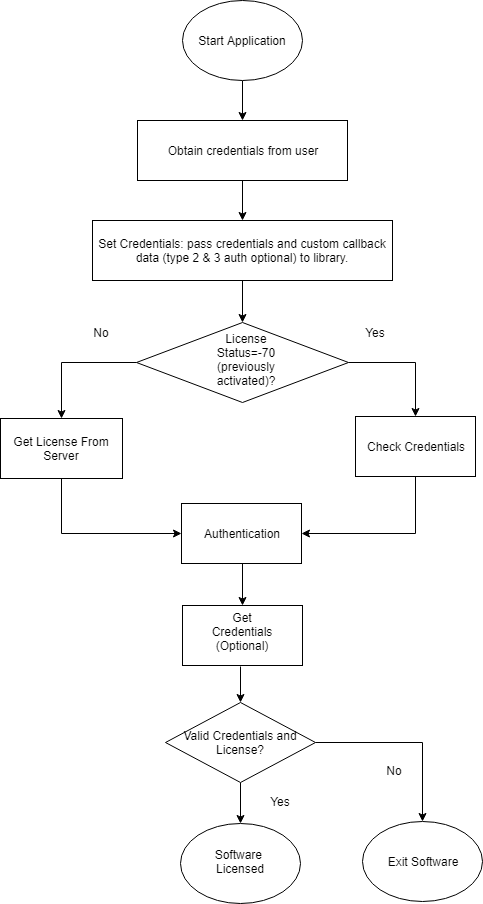
Obtain Credentials: For your end-user to obtain a license, they must first supply to the application their login credentials (username and password.)
Set Credentials: On being received, these must then be set by your application. This step involves setting the credentials in memory for use by the Zentitle client library in subsequent steps of the authentication/activation process. If this process is successful, they will then be written to the local license (.lic) file in the workdir folder. The path to this folder is specified as a parameter passed into the NalpLibOpen function. See here for details. This credential setting stage will also set optional custom data that may be required by the authentication process (see Authentication Modes below.)
Check Credentials: If the license status has the value -70, then this means that, in the previous run of your application, credentials were set in the local license file. The credentials which have just been entered on this run must be compared against these.
This operation validates the credentials passed into the library (with the Set Credentials operation) with any that have been stored in the license file.
If an application has been restarted without either returning the license to the Zentitle server, or the credentials being cleared (see below), the credentials from the previous run will remain in the license file but will not have been authenticated for the current run. The resulting license status value is -70. Checking credentials will verify the supplied ones against those stored in the license file and authenticate them. In the simplest Authentication Mode, the credentials are authenticated on the Zentitle licensing server. In other cases an authentication function is called on a third-party authentication server. Here, the Check Credentials operation will pass a function pointer to the Zentitle client library to call and retrieve the response from the remote authentication function.
Get License From Server: If the license status is not equal to -70, there are no pre-existing credentials in the license file against which the supplied ones must be verified. Both authentication and activation (with the same optional involvement of a third-party server) take place on an attempt to get a license from the Zentitle server i.e. with a call to NSLObtainLicense or offline activation (see below.)
Authentication: See the Authentication Modes section below.
When this authentication succeeds, the credentials are passed to the Zentitle licensing server in subsequent transactions. They are saved to the locally stored license file following a successful activation/refresh of the license. This is carried out using the same functions as are used in device-based licensing, with one difference, this being that the username is passed instead of the license code as a parameter. So for online activation your application would call:
int NSLObtainLicense(const char * authentication, int32_t * licenseStatus,const char * xmlRegInfo,const char * specialID )
where 'authentication' is the license code for device-based licensing and the username for account-based licensing. Similarly, for offline activation, your application would call:
int NSLRequestActivationCert(const char * authentication, const char * xmlRegInfo, const char * specialID, char ** cert)
with 'authentication' having the same dual meaning and likewise for all other API calls which have the license code as a parameter in device-based licensing.
Clear Credentials (Optional): This operation clears the credentials from the license file. If the credentials have been cleared, then the client machine is no longer locally in an ABL state and should be reactivated, either with the Set Credentials operation (if ABL is required) or by supplying a license code (for device-based licensing.) This operation should only be carried out if no license is active, i.e. if the license status <=0.
Get Credentials (optional): This operation retrieves the set username and auxiliary data associated with the credentials setting and authentication. NOTE: this operation, though optional, is very useful for diagnostic purposes, especially in third-party authentication. It returns the authentication callback return value which you may use for your own error codes. It can also be used to return an arbitrary string from the authentication server.
Authentication Modes
Zentitle authentication.
As the diagram below shows, Zentitle Authentication only involves interactions between the client machine and the Zentitle Licensing server for both user authentication and activation.
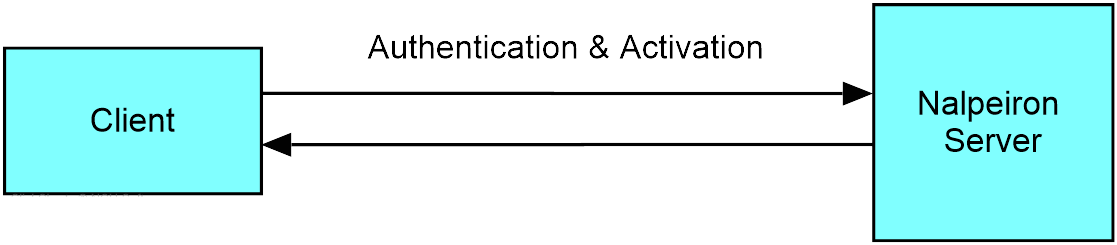
Authentication of the credentials is carried out on the Zentitle licensing server when the credentials are checked and when client attempts to activate/refresh the license with a call to NSLObtainLicense or offline activation. When this succeeds, the credentials are saved to the license file and passed silently to the Zentitle licensing server for client validation during all subsequent client-server transactions. If the client has stored credentials from a previous run, e.g. if it has not returned the license and/or the credentials have not been cleared (latterly for a non-active license with license status <=0) only the local Set Credentials then Check Credentials operations need be carried out to re-license the client application, i.e. it will not have to contact the Zentitle licensing server. This implies that once the credentials have been authenticated, the client can work offline (except for when performing online operations such as checking out floating features) for the remainder of the client lease or license subscription period, whichever is shorter.
Third-party authentication (without token.)
Here, as shown below, authentication is carried out on a third-party server.
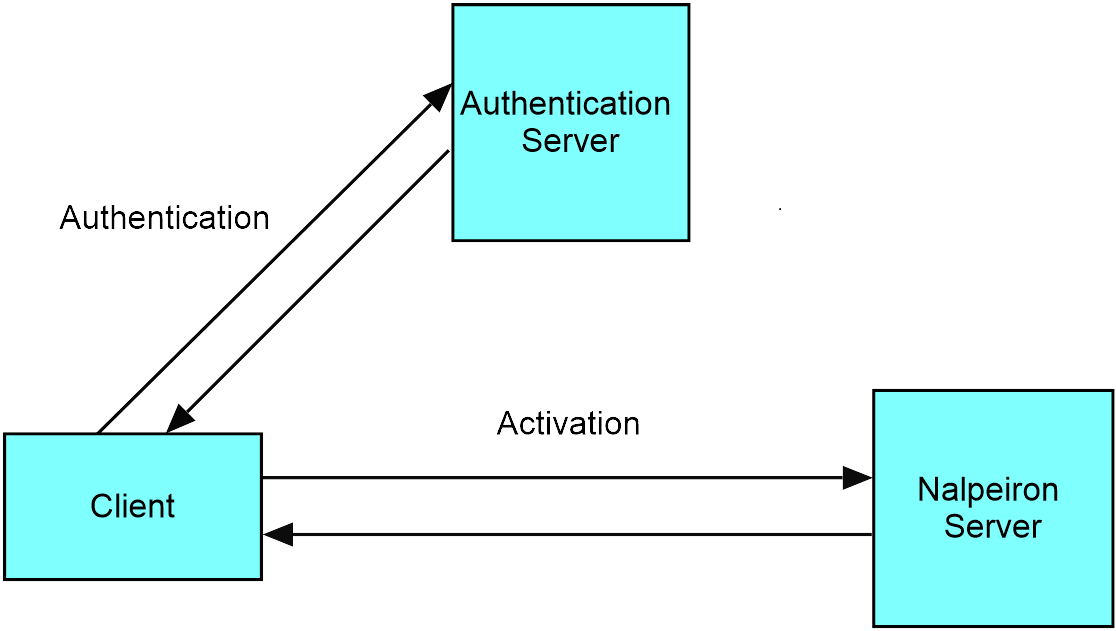
The authentication function is called by the Zentitle client API by means of an arbitrary function pointer, with a callback being used to return to the client the success or failure result of the authentication attempt. Additional, custom data may also be passed into the client and back to the client from the server (passing in, for example the authentication server URL and retrieving error codes from the authentication server.) The stages of this authentication process are as follows:
- Set up call to authentication function on third-party server. This is accomplished by passing a pointer to a function on the client, along with the credentials and optional auxiliary data (such as the authentication server end-point.) This is all set up by performing the Set Credentials operation.
- Client authentication function is called. For an existing activation, this occurs as part of the Check Credentials operation. For a fresh activation (or with returned license/cleared credentials) this occurs as part of the NSLObtainLicense operation.
- The client function sends the credentials and auxiliary data to the authentication server. If the response is success, the client function should exit returning the value 0. Otherwise, it should return a suitable error code. Error codes should be negative.
Third-party authentication (with token.)
Here there is a two-factor authentication involving both a third-party authentication server and the Zentitle Licensing server, as illustrated below.
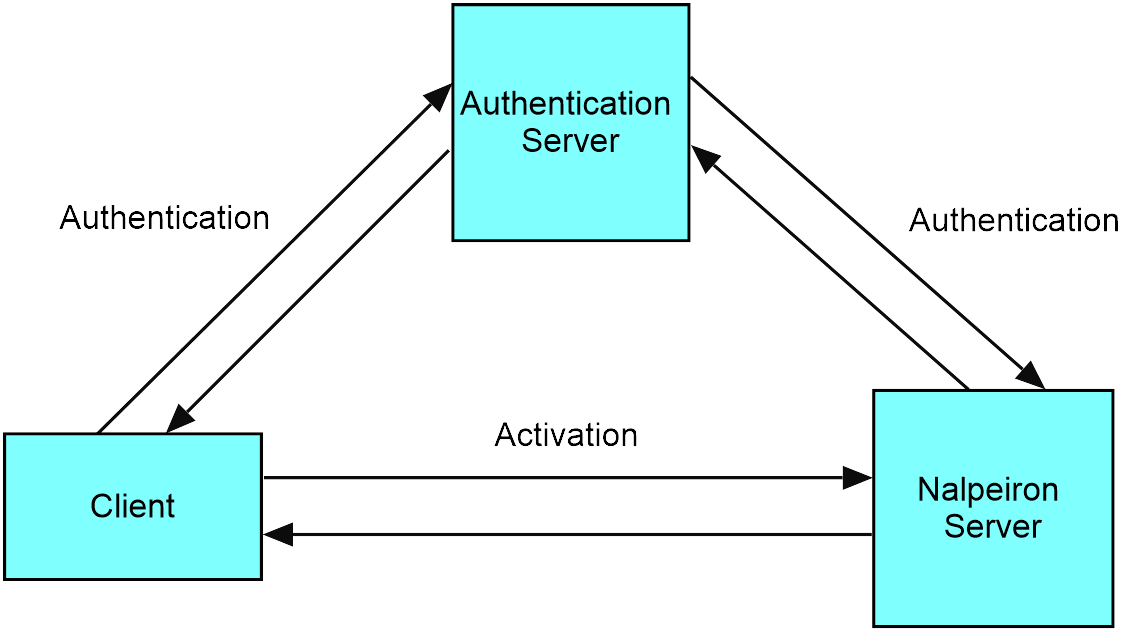
- Set up call to authentication function on third-party server. This is accomplished by passing a pointer to a function on the client, along with the credentials and optional auxiliary data (such as the authentication server end-point.) This is all set up by performing the Set Credentials operation.
- Client authentication function is called. For an existing activation, this occurs as part of the Check Credentials operation. For a fresh activation (or with returned license/cleared credentials) this occurs as part of the NSLObtainLicense operation.
- The client function sends the credentials and auxiliary data to the authentication server. If successful, proceed to step 4. Otherwise return with a suitable error code (negative value)
- We have a second authentication stage whereby the authentication server strengthens the client validation against the Zentitle licensing server by means of a secret authentication token. This token is passed from the authentication server to the Zentitle server on successful client authentication. The token is used by the client, instead of the password, for client validation during all subsequent client-server transactions. If the response is success, the client function should exit returning the value 0. Otherwise, it should return a suitable, negative error code.
API Functions
| int NSLCheckCredentials () |
Validate credentials passed into the library with NSLSetCredentials against any stored in the license file. When a program with an ABL license has been shutdown without a ReturnLicense or a ClearCredentials the credentials are cached in the license file. Once the library is restarted before the license file's entitlements can be accessed those credentials must be verified. This state is indicated by a -70 license status. The verification is done using this call. If the cached credentials are a username/password combination that was initially validated by the Zentitle server then the username and password passed to this function will be validated against those stored in the license file. NOTE the password is never stored or transmitted in plain text. If the cached credentials were initially verified by a callback function then that callback will be called to verify the password and username passed into this function. If the cache credentials were initially verified by a callback with authentication token then that token should be passed into this function in the place of the password. The username and token will be verified against those stored in the license file. Returns: = 0 If the call succeeded < 0 A negative error value is returned |
|---|---|
|
int NSLSetCredentials(const char *username, const char *password, USERAUTH userAuthenticator, uint32_t inDataSize, void * inData) |
Set username and password for future logins to the Zentitle licensing server or for a user provided authentication callback function. The Zentitle library provides three forms of authentication. In the simplest form,the authentication is carried out on the Zentitle server. A username and password are passed to NSLSetCredentials. Both are sent to Zentitle (the password is never stored or transmitted as plain text) for validation. If the Zentitle server validates them a license can be obtains via calls such as NSLObtainLicense. In a second method, in addition to the username a callback function is passed into NSLCredentials. This callback function can be used to authenticate via the API of a third-party authentication service/platform, i.e. responsibility for authentication is borne by the ISV and they have complete freedom as to how they wish to accomplish this. When authentication is required (i.e. when NSLSetCredentials is called but also when functions such as NSLObtainLicense and NSLRequestActivationCert are called) the callback will be called from the library. In this case, the callback will be called from the library. If the callback return is >0, the library will assume that authentication took place and continue to obtain a license. The callback must have the following function prototype: int64_t (*userAuthenticator)(char *uname, char *pword, void *inData, where uname = username pword = password inData = arbitrary data passed to the callback via the library if inData was set via NSLSetCredentials. Can be NULL authToken = an authentication token that may be passed back to the library. It is unused in straight callback authentication. outData = arbitrary data that may be passed back to the library from the callback. It is available via NSLGetCredentials. outDataSize = the size in bytes of the outData If the return from the callback is >= 0, the library will assume that authentication has succeeded. If the return is < 0, the library will assume that authentication has failed. The return value of the callback is available via NSLGetCredentials. In the third method of authentication the callback, used for the same purpose as in the second, provides not just a return value but also an authentication token. The authentication token is passed to Zentitle for all licensing requests and will be verified there before the licensing occurs. One method of using the authentication token would be to generate a random string for the token during the callback. Before returning this string to the library, Zentitle web services would be used to push to Zentitle.
int64_t (*userAuthenticator)(char *uname, char *pword, void *inData,
inData: an optional bit of data that, if non-NULL, will be passed into the userAuthenticator function. A copy of this data is made and stored in memory by the library. Data is NOT stored on disk at any time which means it is lost when the library is closed. NOTE: data is neither used nor stored if a callback is not specified. inDataSize: the size of the inData pointed to by inData. The maximum allowable size is 4k (4096 bytes).
|
|
int NSLGetCredentials (int64_t * lastRet, char ** username, void ** inData, void ** outData) |
Get information from the last SetCredentials (or callback) call. NOTE The values returned by NSLGetCredentials may or may not be the same as those cached in the license file. lastRet: a pointer to a 64 bit signed integer that will contain the last return value from a callback provided to NSLSetCredentials. username: contains the last username set with NSLSetCredentials. username must be cleared with a call to NSLFree. inData: the last data sent to the callback. inData must be cleared with a call to NSLFree. outData: the last data received from the callback. outData must be cleared with a call to NSLFree.
|
|
int NSLClearCredentials() |
Clear username, password, inData, outData and authToken set with NSLSetCredentials and/or a call to the authentication callback. NOTE This function will only clear these values from memory. Any value cached in the license file will not be affected. NSLClearCredentials may only be called when no valid license exists (ie license status <= 0). Returns: = 0 If the call succeeded < 0 A negative error value is returned (Zentitle error returns) |