
Introduction
The purpose of FastSpring integration with Zentitle is to automate processing of orders coming from FastSpring, license code allocation and setting license properties in Zentitle.
FastSpring Dashboard Setup
To get started with setting up your products, bundles and/or subscriptions in FastSpring for intergration with Zentitle, please see the following Fastspring documentation for details:
https://fastspring.com/docs/integrating-Nalpeiron/
Defining Webhook URL
Once you have completed the table, the integration is done via webhooks. To start, add new Webhook URL in FastSpring and provide required parameters in the querystring:
apiUserName: your Nalpeiron API username
apiPassword: your Nalpeiron API password
apiCustomerId: your Nalpeiron Customer ID
Endpoint URL : https://fsconnector.nalpeiron.com/api/webhooks/fastspring
Add the following events
Order.completed
To allow Subscription type licenses :
Subscription.deactivated
Subscription.updated
subscription.charge.completed
Be careful not to implement any other event types as this can interfere with the correct functioning of the FastSpring connector.
You will need to enable the webhook expansion in Fastspring. Please see here for details:
https://docs.fastspring.com/integrating-with-fastspring/webhooks#Webhooks-AboutWebhookExpansion
Product Custom Attributes
Rest of integration is done via Product Custom Attributes, which are specified for each FastSpring product separately.
Possible attributes:
- productId - Zentitle product Id (required)
- profile - Zentitle profile for pulling License Codes (required)
- licenseCodeFormat - a code mask for defining the License Code format. Explained in a section below
- emailFromAddress - FROM email address for the confirmation email: set by default to noreply@nalpeiron.com
- numberofSeats - Number of allowed activations for the given license code as per the order
- aaFields - set AA agility fields in Zentitle. Explained in a section below.
- features - enable/disable features. Explained in a section below.
- clientLeasePeriod - sets codes client lease period
- clientOfflineLeasePeriod - sets codes client offline lease period
- vmLeasePeriod - sets codes VM’s client lease period
- accountIdField - sets name of the AA field where the purchase order id will be stored, example: PurchaseID
- maintenance - if set to true then the subscription end date is entered into the maintenance end date for the License Code
- maintenanceAddon - if maintenance is not set (or is false), set it to the Id of a FastSpring add-on maintenance subscription product, example: maintenance-professional
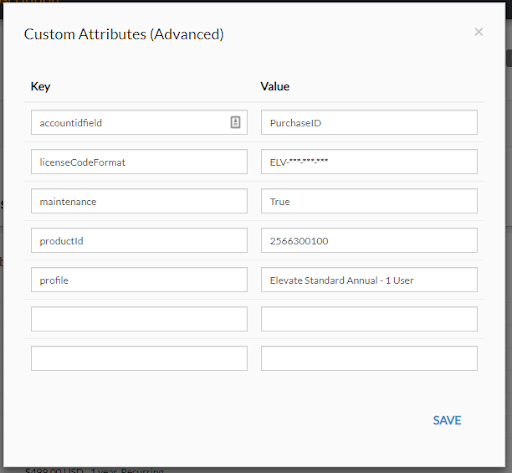
License Code Format
If License Code Format is provided, FS Connector will generate and allocate a license code automatically. To enable this feature, licenseCodeFormat has to be set in product custom attributes. It’s a code mask for defining the LicenseCode format, example: ELV-***-*%*-*%*. Wild cards:
- * - any uppercase letter char (no use of ‘0’)
- % - any numeric char (no use of ‘0’)
The example stated above could generate such code: ELV-HEV-J3D-N7R
If licenseCodeFormat is not set, FS Connector will not allocate new code in the profile. It was acquire an existing license code instead (by calling the GetNextLicenseCode webservice.)
Maintenance handling
Maintenance can be enabled on a purchase by setting maintenance field on a product directly or by adding a separate product to a purchase. In the second case, it’s required to set maintenanceAddon field to the ID if the maintenance product. If this product has been purchased with the main one, the maintenance end date will be set for the allocated Licence Code
AA agility fields
By setting aaFields custom variable it’s possible to specify AA agility variables set in Zentitle for the allocated license code. It should be set to a valid JSON object in a form: {fieldname1: value1, fieldname2: value2}, for example: {“description”: “fsconnector”}
Features
By setting features custom variable it’s possible to enable or disable certain features on an allocated license code. It should be set to a valid JSON object in a form: {feature1:true, feature2: false}, for example {“BATCH”: true, “ADVSM”: false}. Note here that it is the 5 character feature code that is being used to specify each feature.
Automated Account-Based Licensing Setup
When using the Fastspring connector, once a successful purchase has been made, the Fastspring Order Event Details are used to automatically configure the license code for Account-Based Licensing (ABL.) Please see the ABL documentation for further details, in particular how license codes and users are associated with groups.
The Fastspring Order Event Details are used to create an ABL user and assign both this user and the license code to a group, which will be created if it doesn't already exist. The ABL data for the group and user will be as follows:
groupname: This will be set to "FS-{account.ID}" and will be created if it doesn't already exist.
firstname: This will be set to the first name in the account.
lastname: This will be set to the last name in the account.
email: This will be set to the email address in the account.
username: This will also be set to the email address in the account.
password: This is hardcoded as "password" and should be changed to a strong password by the user.