
Introduction
Passive licensing is designed to provide a simple file-based method of licensing. This method is designed primarily for offline activation under circumstances where conventional offline certificate exchange is not possible. Specifically, it is designed to be most useful in situations where an activation certificate cannot be applied from the client to the server and a server certificate imported into the client is required to suffice. Although passive licensing requires that for each client, a client ID be supplied that can be used to uniquely identify each client machine, there is nothing to prevent reuse of a license. For that reason, passive licensing should only be used in situations where you are in control of the hardware, or only trusted uses or no users have access. It was designed for IoT w/o online access, and not for general licensing.
For passive activations, a new set of client components have been created for the current OS line up.
Passive licenses have the following capabilities inherited from the current V10 feature base:
- Features.
- Application Agility Variables.
- Unlimited Client Lease Period.
Server Side Implementation
The ClientID
Passive licensing requires that for each client, a client ID be supplied that can be used to uniquely identify each client machine. This can be for example a MAC address or a unique hardware identifier. It must be a string at least 10 and less than 256 characters long and be XML friendly i.e. contain no XML reserved characters.
The same client ID can be used for all passive licenses on the same client.
Passive License Creation
Passive licenses are created on the Zentitle Licensing portal by clicking the Passive Activation item on the Wrench Menu:
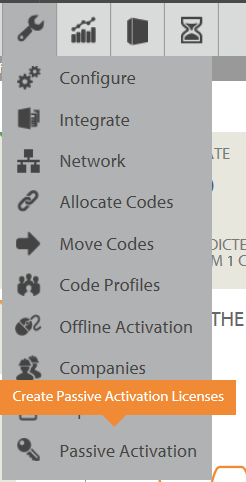
Selecting this option will show the Passive Activation page:
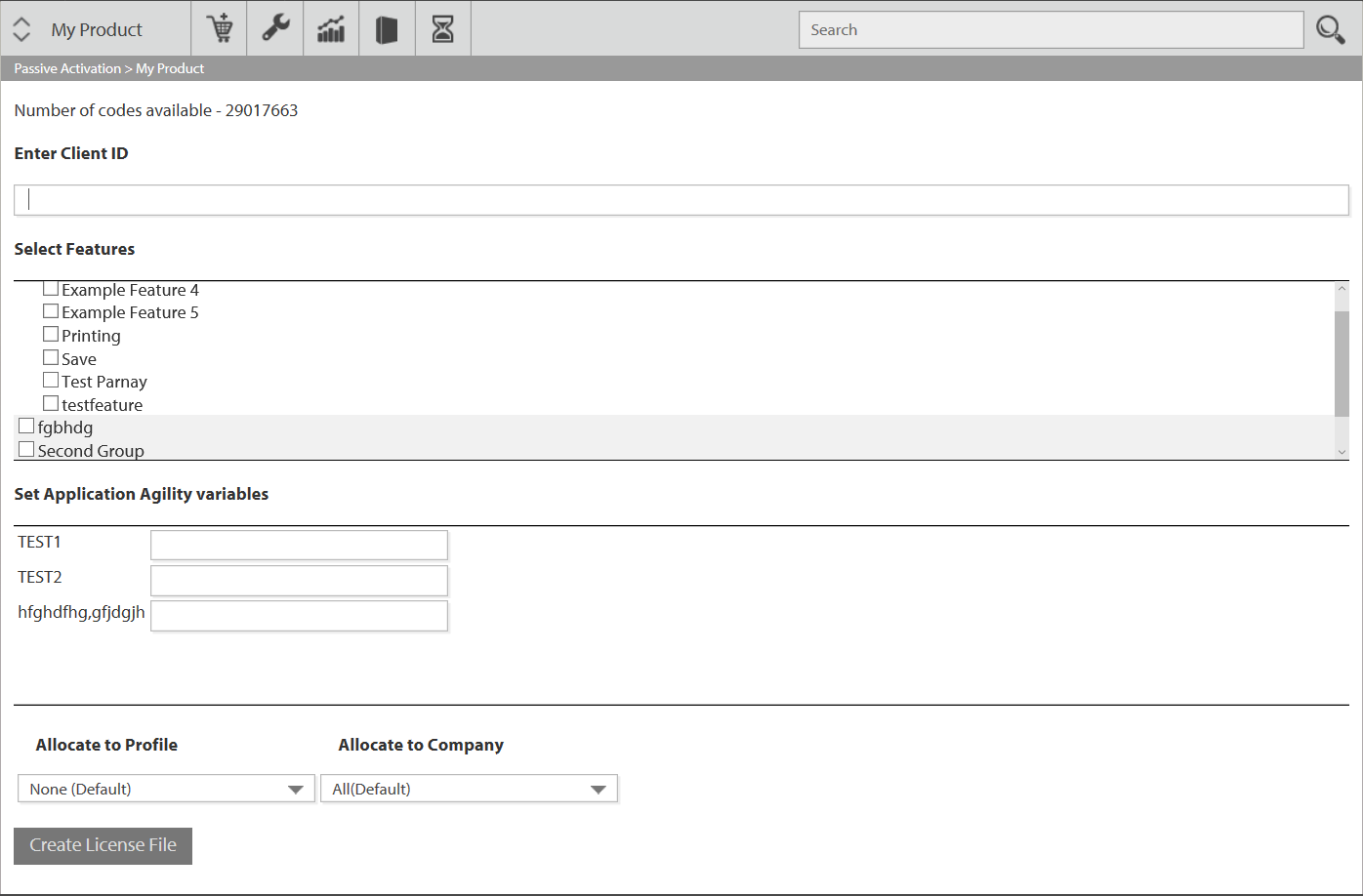
The passive activation page has the following components:
- Number of Codes Available. This shows the number of codes in your code base that can be used to create passive licenses.
- Client ID. Enter the Client ID (min 10 Chars) for which the passive license file is to be created for and locked to.
- Select Features. This allows you to select which features are enabled for this passive license from the standard features that have been defined for the product in question.
- Set Application Agility variables. This allows you to enter the values for the AA variables defined for this product, to be set for the passive license to be generated.
- Allocate to Profile. This is the profile where the new license code is created once the passive license file is generated.
When a passive license is generated, the system will create a license code with the supplied value of the Client ID and add an activation record containing the current date and time.
Passive license codes are distinct from the conventional (henceforth 'active') license codes associated with your products. You cannot import a set of passive license codes.
Any further passive license generated with an existing Client ID will create a new passive license with the new values supplied, update the existing passive license codes, features and AA variables. The system will also add a new activation record with the current created date and time, so as to allow an audit trail of passive licenses created for the Client ID.
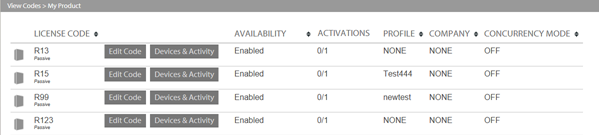
Once a passive license file has been generated, the license code is marked as 'Passive'. This is shown in the ManageCodes view as below to distinguish passive license codes from active V10 license Codes as shown below:
Passive Webservice Calls
The webservice CreatePassiveLicense can be used to create a passive activation certificate. See the webservices documentation for details of this API call.
Client-Side Implementation
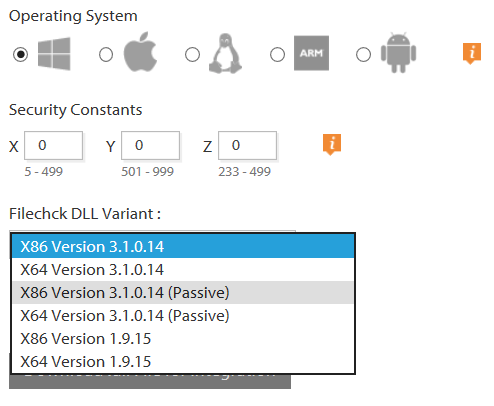
Passive license files on the client side can only be used via passive Client Libraries. These can be generated in the Integrate Menu option as with V10 Client Libraries but are marked as (passive).
Passive Library Function Calls
All functions return non-negative numbers ( >= 0 ) on success and negative number on error. Strings passed into PSL (Passive Service Libraries) are expected to be either ANSI C strings or UTF8 encoded Unicode.
The following functions are provided by the PSL library. Of course, as you will be accessing them from the shared libraries rather than directly you need to use the typedeffed functions pointers (see NalpeironPSL.h) rather than these prototypes. For example, usage see pslExample.c in the code example.
int PSLLibOpen (const char *xmlParams);
Opens and initializes the library. Returns 0 for success and a negative number for an error. PSLLibOpen takes its parameters in the form of an XML string. This parameter choice ensures any future changes to PSLLibOpen will remain backward compatible.
The current form of the XML string is:
<?xml version=\"1.0\" encoding=\"UTF-8\"?>
     <PSLXMLParams>
     <SecurityValue>value</SecurityValue>
     <LicenseCode>ClientID</LicenseCode>
     <LogLevel>int</LogLevel>
     <WorkGroup>group</WorkGroup>
     <MaxLogSize>int</MaxLogSize>
     <WorkDir>dir_path</WorkDir>
     <LogQLen>int</LogQLen>
     </PSLXMLParams>
Here we have:
- SecurityValue. This is a random number in the range 1 to 500 inclusive. The security values are used along with the authentication values stamped into the library to create a unique offset that is added to all returns. The default is 0 (i.e. returns from the library will NOT be modified).
- LicenseCode. This is the ClientID you have associated with the client machine.
- LogLevel. This is an integer 0 to 4. If loglevel is not specified it will default to level 0 (off). You should not use log level higher than 4. The higher levels do not provide any useful end-user debugging.
0 - logging off
1 - errors only
2 - errors and warnings
3 - errors, warnings, and informational messages
4 - errors, warnings, info and debug
-
WorkGroup. This is the working group for the license files, log files, etc on Unix and Unix-like systems. On Windows systems then you should set the ownership and permissions on the containing folder during installation. These permissions/ownerships will then be inherited by the files upon creation. If WorkGroup is empty, the system defaults will be used. That is, the permissions on the files we create are set by the default umask setting of the system (usually 0666 for files and 002 on Linux and 022 on OSX). If the WorkGroup is set, the files are owned by this group and the umask set to 002. NOTE the group must exist or an error will result. A special group is "nalpworld". If the WorkGroup is set to nalpworld the umask is set to 0 allowing universal access to the files.
On most *nix systems, the calling process (ie the process that is using the Zentitle library) must have CAP_SETGID capability. Often, a give process will not have this capability for security reasons which in turns means the library will NOT be able to change its group and thus the group of the files it opens.
To work around this issue set the gid on the work directory to the group you want to own the files in it.
chmod g+s your/WorkDir

chgrp groupname your/WorkDir

or, for WorkDir = /tmp/workdir and workgroup = testgroup

chmod g+s /tmp/workdir

chgrp testgroup /tmp/workdir
This coupled with setting the <WorkGroup> tag will ensure that all files and subdirectories are created with correct group ownership. The setgid on the workdir will ensure the proper group ownership and the <WorkGroup> tag will ensure the umask is set correctly.
- MaxLogSize. This is the maximum length of the log file on disk in bytes. When the log file reaches this size it is truncated to zero length. The default value is 0 (i.e. unlimited growth allowed). It is truncated to zero length. The default value is 0 (i.e. unlimited growth allowed).
- WorkDir. This is the location where PSL will store all its working files (i.e. log file, cache file, license files, etc). If this value is not specified the files will be stored in the default Nalpeiron directory (CWD (current working directory) on Linux and Mac, in a publically accessible directory selected by the OS on Windows).
- LogQLen. This is the maximum length of the log queue.
int PSLLibClose();
Shuts down the library. This function must be called immediately before closing the library (i.e. with dlclose). If this function is not called before the library is closed, information may be lost and memory corruption could occur.
Returns 0 for success and a negative number for an error.
int PSLGetErrorMsg(int pslErrorNo, char **errMsg);
Get a descriptive string for Zentitle error codes. pslErrorno is a negative return value from one of the Zentitle functions and errorMsg is a descriptive string explaining that error. The caller should free errorMsg with PSLFree when the return value is >= 0 i.e. no error.
int PSLGetFilepath(const char *extension, char **filepath);
Get the complete filename and path of log file, cache file, system info file, etc. For log file pass ".log" into extension. The caller should free filepath with PSLFree when the return value is >= 0 i.e. no error.
int PSLValidateLibrary(uint32_t customerID, uint32_t productID);
Verifies that the shared library you are accessing is the library you stamped. It does this by checking the customerID and productID sent in against the stamped values. If they match, 0 (zero) is returned. On mismatch, a negative error value is returned. Any negative return value, even if it is not a known error code, is cause to consider the library invalid.
int PSLGetVersion(char **version);
Returns the version of the PSL library being accessed. The caller should free version with PSLFree when the return value is >= 0 i.e. no error.
int PSLGetComputerID(char **computerID);
Returns the computer ID of the current system. The caller should free computerID with PSLFree when the return value is >= 0 i.e. no error.
int PSLGetLicenseStatus(int32_t *licenseStatus);
Retrieves the status of the current license. Negative values indicate an invalid license state. Possible values:
0 - Undetermined license state
1 - Full license
-1 - Expired license
-2 - Computer backdated too many times
-4 - No license found
-5 - Invalid license
-7 - Invalid system date
-60 - license converted to NSL
int PSLGetLicenseCode(char **licenseCode);
Retrieves the license code used with the current license. The caller should free licenseCode with PSLFree when the return value is >= 0 i.e. no error.
int PSLImportLicense(const char *licenseCode, int32_t *licenseStatus, const char *licenseContainer);
Imports a passive license file into the library. The status of the new license is returned in licenseStatus. The licenseCode is mandatory. The licenseContainer is either the (encrypted) license itself passed in as a NULL terminated string, or the full path to a file containing the license.
int PSLGetFeatureStatus(const char *featureName, int32_t *featureStatus);
Checks the current license for the status of featureName. Status if returned in featureStatus. Possible feature status codes:
1 - Authorized
0 - Unset
-1 - Error
-2 - Unknown Feature Requested
-3 - Feature Request Denied
-4 - Feature Not Authorized
-5 - License Expired
int PSLGetUDFValue(const char *UDFName, char **UDFValue);
Gets the value associated with the UDF (User Defined Field) name. The caller should free UDFValue with PSLFree when the return value is >= 0 i.e. no error.
int PSLGetNumbAvailProc(uint32_t *noProcs, uint32_t *availProc);
A license may limit the number of simultaneous copies allowed to run on a specific computer. This limit is disabled by default and, if desired, must be enabled on the Zentitle server. The number of copies available is set to noProcs+1 and availProc is the number of copies still available for use. When an application instance is started and returns availProc=0, the number of instances exceeds the maximum allowed and this instance should be terminated.
When disabled, this function will always return zero (0) as noProcs and one (1) as the number of availProc.
Limiting the number of processes allowed on a machine ("Number of Concurrent Processes" setting on server) is not affected by the "Concurrency Mode" setting.
int PSLFree(void *memptr);
The PSLFree functions is available to free any memory allocated by the PSL library. This function is mandatory on windows as depending on how your binary is built, your final binary may have a different heap than the PSL library. This function is provided to ensure that memory allocated from the PSL heap is freed there. PSLFree should be used on the memory returned from the PSL library.
Combining Passive and Active Licensing
Zentitle's library has the ability to read the passive license file. The passive licensing library does NOT have the ability to read the standard, dynamic license file.
If the passive library (PSL) is initialized with a workdir containing both a passive license file and a dynamic license file, the dynamic file will be ignored.
If NSL is initialized with a WorkDir containing both a passive and dynamic license file, the passive file will be ignored.
If NSL is initialized with a WorkDir containing ONLY a passive license, the passive license file will be opened and information read from it. The passive license's license status will be changed to PROD_SHAFER_INVALID(-60) and written back to disk. NSL will then create a dynamic license file from this information and write it to disk. The license status of this new file will be -1 and any active features or UDF value will be marked inactive. Thus, immediately after opening NSL in this situation, NSLGetlicense or NSLImportCertificate should be called to obtain a license.
One use case is to activate offline with a passive license, then later if the clients are online switch to active licensing (V10) for online agile licensing. Such a setup would allow you to activate clients offline using a passive license file offline. Then later, when the client is online, licensing may be activated using V10 to allow for a full entitlement license obtained via the cloud using the Client ID as the license code. Once a passive license has been activated using V10, a passive license file cannot be regenerated for the Client ID in question.
For the standard library DLL to read the passive license file at initialization, the passive license code (client ID) must be passed into the NalpLibOpen initialization XML in the <LicenseCode> tag. A missing <LicenseCode> tag at initialization would most likely result in a -1138 error. This license code/client ID, along with a few other things, is used to generate the passive license's encryption key. Without it, the standard library will not be able to decipher the passive license file.