
- Zentitle Web Services
- Webservice endpoint - https://my.nalpeiron.com/shaferws.asmx
Creating/accessing webservices credentials:
1 Login to my.nalpeiron.com
Navigate to "settings" on the top toolbar and then click "webservices" from the drop down menu.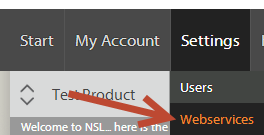
3 Please set your Webservices Username and Password on the screen and ensure you use a strong and secure password. Once you have entered the name and password, click "save".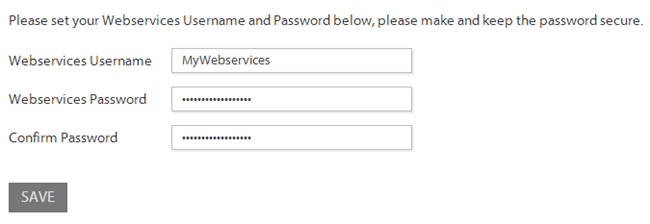
You may use the attached C# application for testing your web service calls and/or as a basis for the integration of our web services with your platform. See bottom of this page for download link.
Webservice Calls
Below are the basic WS calls that are available.
| GetLicenseCode 1 | Get the supplied LicenseCode Details |
| GetCompanyLicenseCodes 1 | Get the LicenseCode Details for your Company |
| GetProduct | Get the supplied product details |
| GetProducts | Get details of all products |
| UpdateLicenseCode | Update the supplied LicenseCode with the supplied values |
| CreateShaferProfile | Create a new code profile |
| UpdateShaferProfile | Update existing code profile |
| GetShaferProfile | Gets information about the supplied profile |
| AllocateImportCodes | Allocate or import license codes |
| CreatePassiveLicense | Creates a client activation certificate for passive licenses. |
| CreateNetworkMasterLicense | Creates a master license to activate the LAN daemon |
| UpdateProduct | Update supplied product with supplied values |
| DeleteLicenseCodeActivity | Deletes Activity Associated with the provided License Code |
| GetNextLicenseCode | Get the next available (unused) license code for given profile |
| GetOfflineActivation | Get the offline activation certificate for the supplied certificate request |
| OfflineDeActivation | Deactivate via the supplied deactivation certificate |
| GetLicenseCodeActivity | Get the supplied license code activity details |
| GetSystemDetails | Get the supplied computerid’s system details (if Available) |
| GetConsumerData | Get the supplied consumer records for specified ProductID & ComputerID |
| CreateConsumerData | Create consumer record and make it searchable on optional fields firstname, lastname, company and email. |
| CheckTrial | Checks the trial status (including if activated with license code) for a given product and computer. |
| ResetTrial | Resets an existing trial for a given user, product and computer. |
| SetLicenseStatusReturned | Sets all statuses of all activations associated with a given license code to 'returned'. |
| GetShaferCompanyInfo | Gets company details for supplied company ID. |
| UpdateShaferCompanyDetails | Updates details for company with supplied company ID.. |
| CreateShaferCompanyDetails | Creates new company details. |
| GetLicenseCodesForShaferCompany | Gets license codes associated with given company ID and Product ID. |
| DeleteShaferCompany | Deletes a company |
| GetAllActivatedLicenseCodes | Gets all currently activated license codes associated with a given computer ID. |
| GetShaferCompanyID | Gets Shafer Company ID for given Shafer Company name and product ID. |
| GetShaferCompanyIDsandProducts | Gets all Shafer Company IDs and associated product IDs. |
| CreateGroup | Creates a group |
| UpdateGroup | Updates a group |
| GetGroup | Gets information about the supplied group |
| DeleteGroup | Deletes a group |
| AddGroupUser | Adds a group user |
| GetGroupUser | Gets information about the supplied group user |
| UpdateGroupUser | Updates a group user |
| UpdateGroupUserPassword | Updates the password of a group user |
| DeleteGroupUser | Deletes a group user |
| AddGroupLicenseCode | Assigns a license code to a group |
| DeleteGroupLicenseCode | Unassigns a license code from a group |
| GetGroupLicenseCode | Gets information about the supplied group license code |
| CreateGroupUserLicense | Creates a group, user and assigns a license |
| AuthenticateGroupUser | Authenticates the credentials of a (non-admin) end-user |
| CreateLicenseNote | Creates a note to be associated with a license code |
| UpdateLicenseNote | Updates a note associated with a license code |
| DeleteLicenseNote | Deletes a note associated with a license code |
1-'subscriptionenddate' and 'subscriptionlastactivated' fields are deprecated by 'subscriptionenddatetime' and
'subscriptionlastactivateddatetime'. Ensure that these deprecated fields are no longer in use by 01 October 2019
(* - mandatory field)
Non Mandatory fields not included in the Data XML will not be updated and the original fields will stay the same as before the call
For example:
<field>Fish & Chips</field>
Should be formatted as below to avoid an error from the WS:
<field>Fish & Chips</field
In addition to those listed above, the Webservice endpoint also contains the following webservices:
AuthenticateUser
FSCheckLicenseCode
FSIncrementMaxClients
GetLicenseCodeByReference
GetLicenseCodesByReference
These are for Zentitle internal use only and so are not documented here.
GetLicenseCode
Inputs
Auth:
| username* | string | webservices username |
|---|---|---|
| password* | string | webservices password |
| customerid* | string | your customer id |
Data:
| productid * | string | product in question |
|---|---|---|
| licensecode* | string | licensecode in question |
| details | int | set to 1 for a detailed breakdown of feature usage by computerid |
| getnotes | int | set to 1 to see notes associated with this license code. |
| userdetails | int | set to 1 for a detailed breakdown of feature usage by computerid and username (for account-based licensing.) |
| getsfs | int | Get server functions (1=yes, no otherwise.) |
Output:
| licensecode | string | licensecode in question |
|---|---|---|
| licensecodeid | int | ID of the licensecode in question |
| enabledforuse | bool | is the LC enabled for use (1 yes, 0 no) |
| licensetype | int | the license type 0=perpetual,1=SubscriptionPeriod, 2=Expiration Date |
| clientsallowed | int | Number of clients allowed |
| clientleaseperiod | int | client lease period in hours |
| webservices | bool | is used by webservices (1 yes, 0 no) |
| networkseats | int | Number of network seats (LAN) (0-2147483647) |
| heartbeat | int | LAN daemon heartbeat (mins) (5-1440) |
| profile | string | Profile to which license code belongs. Returns 'Default' if none. |
| shafercompanyid | int | Company to which the license code has been assigned. |
| vmleaseperiod | int | virtual machine lease period in hours (0=unlimited.) |
| clientofflineleaseperiod | int | client offline lease period in hours |
| subscriptionperiod | int | subscription period in days |
| subscriptionenddate | Date | subscription end date |
| subscriptionlastactivated | Date | date of subscription last activation |
| subscriptionenddatetime | Datetime | subscription end datetime |
| subscriptionlastactivateddatetime | Datetime | datetime of subscription last activation |
| maintenanceenddate | Date | maintenance end date |
| concurrentprocesses | int | number of concurrent processes allowed (0= unlimited) |
| features | string | XML snippet containing the tag for each feature and the value is ON or OFF. MaximumActive/TotalActive=max seats/current seats checked out on floating feature. ElementLimit/ElementCount=max. elements/current no. of elements checked out for element pool. TokenLimit/TokenCount=max. tokens/current no. of tokens checked out for consumption tokens. If details=1, Total gives the total number of seats/elements/tokens checked out for this feature on the computerID shown. If userdetails=1, Total gives the total number of seats/elements/tokens checked out for this feature on the computerID and username shown. |
| aaudf | string | XML snippet containing the tag for each AA variable and the value is the set value for the AA field |
| NumActivations | string | XML snippet containing the number of current activations for this license code. |
| concurrency | int | Concurrency mode of the license code (0=none, 1=cloud, 2=network.) |
| notes | string |
XML snippet containing note data. Root node is <notes> and consists of a list of <note> child tags. Each <note> tag has an ID attribute (integer), a Type attribute ("General" or "System"), a Created datatime, a CreatedBy attribute (logged in user or blank if created by webservices) and the value is the note text itself. |
| serverfunctions | string |
XML snippet containing the tag for each server function and the (enabled) value is ON or OFF. The Parameters attribute shows the value of custom parameters. |
Example Input
Auth:

<auth><username>wsusername</username><password>wspassword</password><customerid>1234</customerid></auth>

Data:

<data><productid>6563301200</productid><licensecode>200100001817930859</licensecode><getsfs>1</getsfs><getnotes>1</getnotes></data>
Example Output
<string xmlns="http://my.nalpeiron.com/V10WS">
<licensecode>
<licensecodeid>2</licensecodeid>
<licensecode>200100001817930859</licensecode>
<enabledforuse>0</enabledforuse>
<licensetype>0</licensetype>
<clientsallowed>15</clientsallowed>
<clientleaseperiod>12</clientleaseperiod>
<clientofflineleaseperiod>8760</clientofflineleaseperiod>
<webservices>0</webservices>
<networkseats>0</networkseats>
<heartbeat>0</heartbeat>
<subscriptionperiod>0</subscriptionperiod>
<subscriptionenddate/>
<maintenanceenddate/>
<subscriptionlastactivated>02 Aug 2018</subscriptionlastactivated>
<subscriptionenddatetime/>
<subscriptionlastactivateddatetime>2018-08-02 06:59:02.043</subscriptionlastactivateddatetime>
<concurrentprocesses>15</concurrentprocesses>
<profile>Test-PC</profile>
<vmleaseperiod>0</vmleaseperiod>
<reference>rja</reference>
<shafercompanyid>76281</shafercompanyid>
<features>
<FEAT1 Type="ElementPool" ElementCount="0" ElementLimit="0">OFF</FEAT1>
<FEAT2 Type="Floating" MaximumActive="0" TotalActive="0">OFF</FEAT2>
<FEAT4 Type="Normal">OFF</FEAT4>
<FEAT5 Type="Normal">OFF</FEAT5>
<FEAT6 Type="Floating" MaximumActive="0" TotalActive="0">OFF</FEAT6>
<FLOAT Type="Floating" MaximumActive="0" TotalActive="0">OFF</FLOAT>
<ACCEP Type="">ON</ACCEP>
</features>
<aaudf>
<TEST1>6</TEST1>
<TEST2>6</TEST2>
</aaudf>
<numactivations>5</numactivations>
<concurrency>0</concurrency>
<notes>
<note ID="102179" Type="General" Created="9/21/2020 3:58:18 PM" CreatedBy="nsa@nalpeiron.com">Another note</note>
<note ID="102180" Type="General" Created="9/25/2020 11:27:59 AM" CreatedBy="nsa@nalpeiron.com">A test note</note>
</notes>
<serverfunctions>
<LTCO Parameters="20">ON</LTCO>
<FeatureAvailabiity Parameters="">ON</FeatureAvailabiity >
</serverfunctions>
</licensecode>
</string>
GetCompanyLicenseCodes
Inputs
Auth:
| username* | string | webservices username |
|---|---|---|
| password* | string | webservices password |
| customerid* | string | your customer id |
Data:
| productid | string | select only license codes for this productid (optional) |
|---|---|---|
| pagenumber | int | If >0 then returns the results on that page. If 0 or omitted then returns only the number of license codes. (optional) |
| pagesize | int | number of records per page (default and max. value=10000) (optional) |
| shafercompany | string | select only license codes for this shafercompany (optional) |
| profile | string | select only license codes for with this profile (optional) |
| webservices | string | select only license codes used ('true') or not used ('false') by webservices (optional) |
| used | string | select only license codes used ('true') or not used ('false') (optional) |
| activated | string | select only license codes activated ('true') or not activated ('false') (optional) |
| getsfs | int | Get server functions (1=yes, no otherwise.) |
Output:
| licensecode | string | licensecode in question |
|---|---|---|
| licensetype | int | the license type 0=perpetual,1=SubscriptionPeriod, 2=Expiration Date |
| ProductCode | string | 10 digit Product ID of the license code. |
| enabled | string | is the LC enabled for use (true/false) |
| profile | string | Profile to which license code belongs |
| shafercompany | string | Company to which the license code has been assigned. |
| usedbywebservices | string | is used by webservices (true/false) |
| activationsallowed | int | Number of activations allowed |
| clientleaseperiod | int | client lease period in hours |
| networkseats | int | Number of network seats (LAN) (0-2147483647) |
| heartbeat | int | LAN daemon heartbeat (mins) (5-1440) |
| concurrency | int | Concurrency mode of the license code (0=none, 1=cloud, 2=network.) |
| subscriptionperiod | int | subscription period in days |
| subscriptionenddate | date | subscription end date |
| subscriptionenddatetime | Datetime | subscription end datetime |
| subscriptionlastactivateddatetime | Datetime | datetime of subscription last activation |
| maintenanceenddate | date | maintenance end date |
| concurrentprocesses | int | number of concurrent processes allowed (0= unlimited) |
| offlineleaseperiod | int | offline client lease period in hours (0=unlimited.) |
| vmleaseperiod | int | virtual machine client lease period in hours (0=unlimited.) |
| created | date | date when code was allocated/imported. |
| modified | date | date when code was last modified. |
| numactivations | int | current number of activations |
| numdeactivations | int | number of deactivations |
| features | string | XML snippet containing the tag for each feature and the value is ON or OFF. * |
| aaudfs | string | XML snippet containing the tag for each AA variable and the value is the set value for the AA field |
| serverfunctions | string | XML snippet containing the tag for each server function and the (enabled) value is ON or OFF. The Parameters attribute shows the value of custom parameters. |
Example Input
Auth:

<auth><username>wsusername</username><password>wspassword</password><customerid>1234</customerid></auth>

Data:
<data><pagenumber>1</pagenumber><pagesize>100</pagesize><shafercompany>My Company</shafercompany><profile>Test-PC</profile></data>
Example Output
<string xmlns="http://my.nalpeiron.com/V10WS">
<data>
<licensedetails>
<licensecode>200100001817930859</licensecode>
<ProductCode>6563301200</ProductCode>
<enabled>false</enabled>
<licensetype>0</licensetype>
<profile>Test-PC</profile>
<shafercompany>O&apos;Malley</shafercompany>
<usedbywebservices>false</usedbywebservices>
<activationsallowed>15</activationsallowed>
<networkseats>0</networkseats>
<heartbeat>0</heartbeat>
<concurrency>0</concurrency>
<subscriptionperiod>0</subscriptionperiod>
<subscriptionenddate/>
<maintenanceenddate/>
<subscriptionlastactivated>02 Aug 2018</subscriptionlastactivated>
<subscriptionenddatetime/>
<subscriptionlastactivateddatetime>2018-08-02 06:59:02.043</subscriptionlastactivateddatetime>
<concurrentprocesses>15</concurrentprocesses>
<clientleaseperiod>12</clientleaseperiod>
<offlineleaseperiod>8760</offlineleaseperiod>
<vmleaseperiod>0</vmleaseperiod>
<created>2013-06-12 00:00:00.000</created>
<modified>2020-09-30 16:18:15.667</modified>
<numactivations>5</numactivations>
<numdeactivations>38</numdeactivations>
<features>
<feature>
<featurecode>ACCEP</featurecode>
<availability>ON</availability>
<featuretype/>
<TotalActive>0</TotalActive>
<maximumactive>0</maximumactive>
<elementCount>0</elementCount>
<elementLimit>0</elementLimit>
</feature>
<feature>
<featurecode>ACCFF</featurecode>
<availability>ON</availability>
<featuretype/>
<TotalActive>0</TotalActive>
<maximumactive>0</maximumactive>
<elementCount>0</elementCount>
<elementLimit>0</elementLimit>
</feature>
</features>
<aaudfs>
<aaudf>
<fieldname>TEST1</fieldname>
<value>6</value>
</aaudf>
<aaudf>
<fieldname>TEST2</fieldname>
<value>6</value>
</aaudf>
</aaudfs>
<serverfunctions>
<LTCO Parameters="20">ON</LTCO>
<FeatureAvailabiity Parameters="">ON</FeatureAvailabiity>
</serverfunctions>
</licensedetails>
<licensedetails>
<licensecode>318300000248078275</licensecode>
<enabled>true</enabled>
<licensetype>0</licensetype>
<profile>Test-PC</profile>
<shafercompany>My Company</shafercompany>
<usedbywebservices>false</usedbywebservices>
<activationsallowed>15</activationsallowed>
<networkseats>0</networkseats>
<heartbeat>0</heartbeat>
<concurrency>0</concurrency>
<subscriptionperiod>0</subscriptionperiod>
<subscriptionenddate/>
<maintenanceenddate/>
<subscriptionlastactivated/>
<subscriptionenddatetime/>
<subscriptionlastactivateddatetime/>
<concurrentprocesses>15</concurrentprocesses>
<clientleaseperiod>1</clientleaseperiod>
<offlineleaseperiod>8760</offlineleaseperiod>
<vmleaseperiod>0</vmleaseperiod>
<created>2013-06-25 09:52:52.000</created>
<modified>2016-05-13 09:33:43.567</modified>
<numactivations>4</numactivations>
<numdeactivations>2</numdeactivations>
<features>
<feature>
<featurecode>FEAT1</featurecode>
<availability>ON</availability>
<featuretype>ElementPool</featuretype>
<TotalActive>0</TotalActive>
<maximumactive>0</maximumactive>
<elementCount>0</elementCount>
<elementLimit>0</elementLimit>
</feature>
<feature>
<featurecode>FEAT2</featurecode>
<availability>ON</availability>
<featuretype>Floating</featuretype>
<TotalActive>0</TotalActive>
<maximumactive>0</maximumactive>
<elementCount>0</elementCount>
<elementLimit>0</elementLimit>
</feature>
</features>
<aaudfs>
<aaudf>
<fieldname>TEST1</fieldname>
<value>4</value>
</aaudf>
<aaudf>
<fieldname>TEST2</fieldname>
<value>4</value>
</aaudf>
</aaudfs>
<serverfunctions>
<LTCO Parameters="">OFF</LTCO>
<FeatureAvailabiity Parameters="">ON</FeatureAvailabiity >
</serverfunctions>
</licensedetails>
</data>
</string>
GetProduct
Inputs
Auth:
| username* | string | webservices username |
|---|---|---|
| password* | string | webservices password |
| customerid* | string | your customer id |
Data:
| productid* | string | product in question |
|---|
Output
| productname | string | name of product |
|---|---|---|
| productid | string | id of product |
| clientleaseperiod | int | client lease period (Trial) in hrs |
| clientofflineleaseperiod | int | client offline lease period in hrs |
| vmleaseperiod | int | virtual machine lease period in hours (0=unlimited.) |
| trialperiod | int | Trial Period in days |
| features | string | XML snippet containing the tag for each feature and the value is ON or OFF. These have a "Type" attribute with the possible values: "Normal", "Floating", "ElementPool" and "ConsumptionToken". |
| aaudf** | string | XML snippet containing the tag for each AA variable and the value is the set value for the AA field |
** - Spaces in field names will be parsed as underscore '_' characters.
Example Input
Auth:

<auth><username>wsusername</username><password>wspassword</password><customerid>1234</customerid></auth>

Data:

<data><productid>1234567890</productid></data>
Example Output
<product>
 <productname>ABL Test Product1</productname>
 <productid>6563300100</productid>
 <clientleaseperiod>2</clientleaseperiod>
 <clientofflineleaseperiod>0</clientofflineleaseperiod>
 <trialperiod>5</trialperiod>
 <vmleaseperiod>1</vmleaseperiod>
 <features>
 <FEAT1 Type="ElementPool">OFF</FEAT1>
 <FEAT2 Type="Floating">OFF</FEAT2>
 <FEAT4 Type="Normal">ON</FEAT4>
 <FEAT5 Type="Normal">OFF</FEAT5>
 <FEAT6 Type="Floating">OFF</FEAT6>
 <FLOAT Type="Floating">OFF</FLOAT>
 <ACCEP Type="">OFF</ACCEP>
 <ACCFF Type="">OFF</ACCFF>
 <EPOOL Type="ElementPool">OFF</EPOOL>
 <TOKEN Type="ConsumptionToken">OFF</TOKEN>
 <NSA Type="Normal">ON</NSA>
 <RJANS Type="Normal">ON</RJANS>
 </features>
 <aaudf>
 <TEST1>Prod1Default</TEST1>
 <TEST2>Prod1Default</TEST2>
 </aaudf>
</product>
GetProducts
Inputs
Auth:
| username* | string | webservices username |
|---|---|---|
| password* | string | webservices password |
| customerid* | string | your customer id |
Data:
None
Output
1 or more sets of:
| productname | string | name of product |
|---|---|---|
| productid | string | id of product |
| clientleaseperiod | int | client lease period (Trial) in hrs |
| vmleaseperiod | int | virtual machine lease period in hours (0=unlimited.) |
| clientofflineleaseperiod | int | client offline lease period in hrs |
| Trialperiod | int | Trial Period in days |
| features | string | XML snippet containing the tag for each feature and the value is ON or OFF. These have a "Type" attribute with the possible values: "Normal", "Floating", "ElementPool" and "ConsumptionToken". |
| aaudf** | string | XML snippet containing the tag for each AA variable and the value is the set value for the AA field |
** - Spaces in field names will be parsed as underscore '_' characters.
Example Input
Auth:

<auth><username>wsusername</username><password>wspassword</password><customerid>1234</customerid></auth>

Data:

<data></data>
Example Output
<product>
 <productname>ABL Test Product1</productname>
 <productid>6563300100</productid>
 <clientleaseperiod>2</clientleaseperiod>
 <clientofflineleaseperiod>0</clientofflineleaseperiod>
 <trialperiod>5</trialperiod>
 <vmleaseperiod>1</vmleaseperiod>
 <features>
 <FEAT1 Type="ElementPool">OFF</FEAT1>
 <FEAT2 Type="Floating">OFF</FEAT2>
 <FEAT4 Type="Normal">ON</FEAT4>
 <FEAT5 Type="Normal">OFF</FEAT5>
 <FEAT6 Type="Floating">OFF</FEAT6>
 <FLOAT Type="Floating">OFF</FLOAT>
 <ACCEP Type="">OFF</ACCEP>
 <ACCFF Type="">OFF</ACCFF>
 <EPOOL Type="ElementPool">OFF</EPOOL>
 <TOKEN Type="ConsumptionToken">OFF</TOKEN>
 <NSA Type="Normal">ON</NSA>
 <RJANS Type="Normal">ON</RJANS>
 </features>
 <aaudf>
 <TEST1>Prod1Default</TEST1>
 <TEST2>Prod1Default</TEST2>
 </aaudf>
 </product>
 <product>
 <productname>Test Product 2 Renamed11</productname>
 <productid>3137400101</productid>
 <clientleaseperiod>0</clientleaseperiod>
 <clientofflineleaseperiod>0</clientofflineleaseperiod>
 <trialperiod>30</trialperiod>
 <vmleaseperiod>0</vmleaseperiod>
 <features/>
 <aaudf>
 <TestAshok1>Prod2Default</TestAshok1>
 <Test>Prod2Default</Test>
 <TestRavi2>Prod2Default</TestRavi2>
 </aaudf>
 </product>
 <product>
 <productname>Product 14022013</productname>
 <productid>4142100112</productid>
 <clientleaseperiod>24</clientleaseperiod>
 <clientofflineleaseperiod>72</clientofflineleaseperiod>
 <trialperiod>30</trialperiod>
 <vmleaseperiod>0</vmleaseperiod>
 <features/>
 <aaudf>
 <Field1>Value1</Field1>
 <Field2>Value2</Field2>
 <Field3>Value3</Field3>
 <Field4>Value4</Field4>
 </aaudf>
 </product>
 <product>
 <productname>NightlyBuilds</productname>
 <productid>6567800113</productid>
 <clientleaseperiod>0</clientleaseperiod>
 <clientofflineleaseperiod>0</clientofflineleaseperiod>
 <trialperiod>30</trialperiod>
 <vmleaseperiod>0</vmleaseperiod>
 <features>
 <FEAT1 Type="Normal">OFF</FEAT1>
 <FEAT3 Type="Normal">OFF</FEAT3>
 <FEAT6 Type="Floating">OFF</FEAT6>
 <FEAT4 Type="Normal">OFF</FEAT4>
 <FEAT5 Type="Normal">OFF</FEAT5>
 <FEAT7 Type="ElementPool">OFF</FEAT7>
 <CONS1 Type="ConsumptionToken">OFF</CONS1>
 </features>
 <aaudf>
 <TEST1>This is a test1 string</TEST1>
 </aaudf>
 </product>
<product>
 <productname>ABL Test Product1</productname>
 <productid>6563300100</productid>
 <clientleaseperiod>2</clientleaseperiod>
 <clientofflineleaseperiod>0</clientofflineleaseperiod>
 <trialperiod>5</trialperiod>
 <vmleaseperiod>1</vmleaseperiod>
 <features>
 <FEAT1 Type="ElementPool">OFF</FEAT1>
 <FEAT2 Type="Floating">OFF</FEAT2>
 <FEAT4 Type="Normal">ON</FEAT4>
 <FEAT5 Type="Normal">OFF</FEAT5>
 <FEAT6 Type="Floating">OFF</FEAT6>
 <FLOAT Type="Floating">OFF</FLOAT>
 <ACCEP Type="">OFF</ACCEP>
 <ACCFF Type="">OFF</ACCFF>
 <EPOOL Type="ElementPool">OFF</EPOOL>
 <TOKEN Type="ConsumptionToken">OFF</TOKEN>
 <NSA Type="Normal">ON</NSA>
 <RJANS Type="Normal">ON</RJANS>
 </features>
 <aaudf>
 <TEST1>Prod1Default</TEST1>
 <TEST2>Prod1Default</TEST2>
 </aaudf>
</product>
<product>
 <productname>Test Product 2 Renamed11</productname>
 <productid>3137400101</productid>
 <clientleaseperiod>0</clientleaseperiod>
 <clientofflineleaseperiod>0</clientofflineleaseperiod>
 <trialperiod>30</trialperiod>
 <vmleaseperiod>0</vmleaseperiod>
 <features/>
 <aaudf>
 <TestAshok1>Prod2Default</TestAshok1>
 <Test>Prod2Default</Test>
 <TestRavi2>Prod2Default</TestRavi2>
 </aaudf>
</product>
<product>
 <productname>Product 14022013</productname>
 <productid>4142100112</productid>
 <clientleaseperiod>24</clientleaseperiod>
 <clientofflineleaseperiod>72</clientofflineleaseperiod>
 <trialperiod>30</trialperiod>
 <vmleaseperiod>0</vmleaseperiod>
 <features/>
 <aaudf>
 <Field1>Value1</Field1>
 <Field2>Value2</Field2>
 <Field3>Value3</Field3>
 <Field4>Value4</Field4>
 </aaudf>
</product>
UpdateLicenseCode
Inputs
Auth:
| username* | string | webservices username |
|---|---|---|
| password* | string | webservices password |
| customerid* | string | your customer id |
Data:
| shafercompanyid | int | id of the company in question (optional) |
|---|---|---|
| productid* | string | product in question |
| licensecode* | string | licensecode in question |
| clientleaseperiod | int | Client Lease period in hrs (0=unlimited, max 8760) |
| clientofflineleaseperiod | int | Client Offline lease period in days (0=unlimited, max 500) |
| vmleaseperiod | int | virtual machine lease period in days (0=unlimited, max 500) |
| enabledforuse | bool | is the LC enabled for use (1 yes, 0 no) |
| licensetype | int | the license type 0=perpetual,1=SubscriptionPeriod, 2=Expiration Date. Note: this must be included whenever the license type is changed, including from SubsciptionPeriod to ExpirationDate and vice versa. |
| clientsallowed | int | Number of clients allows |
| webservices | bool | is used by webservices (1 yes, 0 no) |
| profile | string | sets the code profile ('default'=none/default) |
| inheritprofile | bool | inherits profile properties (1 yes, 0 no) |
| subscriptionperiod | int | subscription period in days. This field should be supplied only for SubscriptionPeriod license type. Omit for other license types. |
| subscriptionenddate | Date | subscription end date. This field should be supplied only for ExpirationDate license type. Omit for other license types. |
| maintenanceenddate | Date | maintenance end date |
| concurrentprocesses | int | number of concurrent processes allowed (0= unlimited) |
| concurrency | int | concurrency type (0=off, 1=cloud, 2=network) |
| networkseats | int | Number of network seats (LAN) (0-2147483647) |
| heartbeat | int | LAN daemon heartbeat (mins) (5-1440) |
| features | string |
XML snippet containing the tag for each feature and the value is ON or OFF. The format is as follows: <features> <Feat1>OFF</Feat1> <Feat2 Limit="100">ON</Feat2> </features> The element value is set to ON/OFF to enable/disable the feature for the specified license code. The optional Limit attribute applies to floating features and element pools, for which it respectively sets the maximum number of seats and the maximum number of elements available to this code. |
| aaudf | string | XML snippet containing the tag for each application agility variable and the value is the set value for the application agility field |
| notes | string |
XML snippet containing note data. Root node is <notes> and consists of a list of <note> child tags. Each child tag has the form <note Type="type">value</note>. If "type"="general" or "system", a corresponding general or system note will be created with text=value. If "type"="delete" and value=a note ID, then the note with this note ID will be deleted. If "type"="deleteall" then all notes associated with this license code will be deleted. Types are processed in the following order: deleteall, then delete, then general/system. |
| serverfunctions | string |
XML snippet containing the tag for each server function, the enabled value ON or OFF and the parameters attribute. The format is as follows: <serverfunctions> <name1 Parameters=params1>enabled1</name1> <name2 Parameters=params2>enabled2</name2> ... </serverfunctions> Currently, only one editable server function has been implemented, Long-Term Checkout License with function name 'LTCO'. The value of the Parameters attribute should be the integer value of the maximum check-out period in days (0 - 2147483647), e.g. <serverfunctions> <LTCO Parameters="20">ON</LTCO> </serverfunctions> |
Output:
OK for correct update or error description
Example Input
Auth:
<auth><username>wsusername</username><password>wspassword</password><customerid>1234</customerid></auth>
Data:
<data><shafercompanyid>6</shafercompanyid><productid>6563300100</productid><licensecode>200100001817930859</licensecode><clientleaseperiod>2</clientleaseperiod><clientofflineleaseperiod>30</clientofflineleaseperiod><enabledforuse>0</enabledforuse><clientsallowed>42</clientsallowed><subscriptionperiod>43</subscriptionperiod><subscriptionenddate>12 Jan 2014 12:30</subscriptionenddate><licensetype>2</licensetype><maintenanceenddate>12 Jan 2014 12:31</maintenanceenddate><webservices>1</webservices><profile>test</profile><inheritprofile>1</inheritprofile><concurrentprocesses>143</concurrentprocesses><concurrency>0</concurrency><features><FEAT1>OFF</FEAT1></features><aaudf><TEST>A New Value</TEST></aaudf><notes><note Type="deleteall"></note><note Type="General">My First Note</note><note Type="System">My Second Note</note></notes><serverfunctions><LTCO Parameters="20">ON</LTCO></serverfunctions></data>
Example Output
OK
CreateShaferProfile
Inputs
Auth:
| username* | string | webservices username |
|---|---|---|
| password* | string | webservices password |
| customerid* | string | your customer id |
Data:
| profilename* | string | name of the new profile |
|---|---|---|
| productid* | string | product in question |
| clientleaseperiod | int | Client Lease period in hrs (max 8760) |
| clientofflineleaseperiod | int | Client Offline lease period in days (max 500) |
| vmleaseperiod | int | virtual machine lease period in hours (max 500) (0=unlimited.) |
| enabledforuse | bool | are license codes in this profile enabled for use (1 yes, 0 no) |
| licensetype | int | the license type 0=perpetual,1=SubscriptionPeriod, 2=Expiration Date. |
| clientsallowed | int | Number of clients allowed |
| webservices | bool | is used by webservices (1 yes, 0 no) |
| subscriptionperiod | int | subscription period in days |
| subscriptionenddate | Date | subscription end date. |
| maintenanceenddate | Date | maintenance end date |
| concurrentprocesses | int | number of concurrent processes allowed (0= unlimited) |
| concurrency | int | concurrency type (0=off, 1=cloud, 2=network) |
| reseller | string | name of reseller to which profile is assigned |
| networkseats | int | Number of network seats (LAN) (0-2147483647) |
| heartbeat | int | LAN daemon heartbeat (mins) (5-1440) |
| features | string |
XML snippet containing the tag for each feature and the value is ON or OFF. The format is as follows: <features> <Feat1>OFF</Feat1> <Feat2 Limit="100">ON</Feat2> <features> Here, 'Feat1', Feat2' etc. are the 5 character feature IDs for the features in the specified product. The element value is set to ON/OFF to enable/disable the feature for the specified license code. The optional Limit attribute applies to floating features and element pools, for which it respectively sets the maximum number or seats and the maximum number of elements available to this code. |
| aaudf | string | XML snippet containing the tag for each AA variable and the value is the set value for the AA field |
| serverfunctions | string |
XML snippet containing the tag for each server function, the enabled value ON or OFF and the parameters attribute. The format is as follows: <serverfunctions> <name1 Parameters=params1>enabled1</name1> <name2 Parameters=params2>enabled2</name2> ... </serverfunctions> Currently, only one server function has been implemented, Long-Term Checkout License with function name 'LTCO'. The value of the parameters attribute should be the integer value of the maximum check-out period in days (0 - 2147483647), e.g. <serverfunctions> <LTCO Parameters="20">ON</LTCO> </serverfunctions> |
Output:
OK for correct update or error description
Example Input
Auth:
<auth><username>wsusername</username><password>wspassword</password><customerid>1234</customerid></auth>
Data:
<data> <productid>6563300100</productid><reseller>LiveReseller</reseller><clientleaseperiod>1</clientleaseperiod><clientofflineleaseperiod>2</clientofflineleaseperiod><vmleaseperiod>3</vmleaseperiod><subscriptionperiod>4</subscriptionperiod><profilename>wstest10</profilename><subscriptionenddate>12 June 2019</subscriptionenddate><licensetype>1</licensetype><maintenanceenddate>13 June 2019</maintenanceenddate><concurrency>2</concurrency><enabledforuse>0</enabledforuse><clientsallowed>10</clientsallowed><concurrentprocesses>5</concurrentprocesses><webservices>1</webservices><networkseats>7</networkseats><heartbeat>8</heartbeat><features><FEAT1 Limit="16">ON</FEAT1><FEAT4 Limit="16">ON</FEAT4><FERT2 Limit="20">ON</FERT2><ACCEP Limit="17">ON</ACCEP><ACCFF Limit="19">ON</ACCFF></features><aaudf><TEST1>A New Value50</TEST1></aaudf><serverfunctions><LTCO Parameters="20">ON</LTCO></serverfunctions></data>
Example Output
OK
UpdateShaferProfile
Inputs
Auth:
| username* | string | webservices username |
|---|---|---|
| password* | string | webservices password |
| customerid* | string | your customer id |
Data:
| profilename* | string | name of the profile to be updated |
|---|---|---|
| productid* | string | product in question |
| newprofilename | string | new name of profile |
| clientleaseperiod | int | Client Lease period in hrs (max 8760) |
| clientofflineleaseperiod | int | Client Offline lease period in days (max 500) |
| vmleaseperiod | int | virtual machine lease period in hours (max 500) (0=unlimited.) |
| enabledforuse | bool | are license codes in this profile enabled for use (1 yes, 0 no) |
| licensetype | int | the license type 0=perpetual,1=SubscriptionPeriod, 2=Expiration Date. Note: this must be included whenever the license type is changed, including from SubsciptionPeriod to ExpirationDate and vice versa. |
| clientsallowed | int | Number of clients allowed |
| webservices | bool | is used by webservices (1 yes, 0 no) |
| subscriptionperiod | int | subscription period in days |
| subscriptionenddate | Date | subscription end date. |
| maintenanceenddate | Date | maintenance end date |
| concurrentprocesses | int | number of concurrent processes allowed (0= unlimited) |
| concurrency | int | concurrency type (0=off, 1=cloud, 2=network) |
| reseller | string | name of reseller to which profile is assigned |
| inheritprofile | bool | license codes currently in profile to inherit updated profile properties (1 yes, 0 no) |
| networkseats | int | Number of network seats (LAN) (0-2147483647) |
| heartbeat | int | LAN daemon heartbeat (mins) (5-1440) |
| features | string |
XML snippet containing the tag for each feature and the value is ON or OFF. The format is as follows: <features> <Feat1>OFF</Feat1> <Feat2 Limit="100">ON</Feat2> <features> The element value is set to ON/OFF to enable/disable the feature for the specified license code. The optional Limit attribute applies to floating features and element pools, for which it respectively sets the maximum number or seats and the maximum number of elements available to this code. |
| aaudf | string | XML snippet containing the tag for each AA variable and the value is the set value for the AA field |
| serverfunctions | string |
XML snippet containing the tag for each server function, the enabled value ON or OFF and the parameters attribute. The format is as follows: <serverfunctions> <name1 Parameters=params1>enabled1</name1> <name2 Parameters=params2>enabled2</name2> ... </serverfunctions> Currently, only one server function has been implemented, Long-Term Checkout License with function name 'LTCO'. The value of the parameters attribute should be the integer value of the maximum check-out period in days(0 - 2147483647), e.g. <serverfunctions> <LTCO Parameters="20">ON</LTCO> </serverfunctions> |
Output:
OK for correct update or error description
Example Input
Auth:
<auth><username>wsusername</username><password>wspassword</password><customerid>1234</customerid></auth>
Data:
<data><productid>6563300100</productid><reseller>LiveReseller</reseller><clientleaseperiod>10</clientleaseperiod><clientofflineleaseperiod>20</clientofflineleaseperiod><vmleaseperiod>30</vmleaseperiod><subscriptionperiod>40</subscriptionperiod><profilename>NewTest-PC</profilename><newprofilename>wstest11</newprofilename><subscriptionenddate>12 June 2020</subscriptionenddate><licensetype></licensetype><maintenanceenddate>13 June 2020</maintenanceenddate><concurrency>2</concurrency><enabledforuse>1</enabledforuse><clientsallowed>100</clientsallowed><concurrentprocesses>50</concurrentprocesses><webservices>1</webservices><networkseats>700</networkseats><heartbeat>80</heartbeat><features><FEAT1 Limit="160">OFF</FEAT1><FEAT4 Limit="160">ON</FEAT4><FEAT7 Limit="210">ON</FEAT7><ACCEP Limit="170">ON</ACCEP><FLOAT Limit="270">ON</FLOAT><ACCFF Limit="190">ON</ACCFF></features><aaudf><TEST1>A New Value5</TEST1></aaudf><inheritprofile>1</inheritprofile><serverfunctions><LTCO Parameters="20">ON</LTCO>/serverfunctions></data>
Example Output
OK
GetShaferProfile
Inputs
Auth:
| username* | string | webservices username |
|---|---|---|
| password* | string | webservices password |
| customerid* | string | your customer id |
Data:
| productid* | string | ID of product in question |
|---|---|---|
| profilename* | string | name of the profile in question |
| getsfs | int | Get server functions (1=yes, no otherwise.) |
Output
| profileid | string | ID of the profile in question |
|---|---|---|
| profilename | int | name of the profile in question |
| enabledforuse | int | license enabled for use 1=yes, 0=no |
| licensetype | int | the license type 0=perpetual,1=SubscriptionPeriod, 2=Expiration Date |
| clientsallowed | int | number of client activations allowed |
| clientleaseperiod | int | client lease period in hours |
| webservices | int | is used by webservices (1 yes, 0 no) |
| networkseats | int | Number of network seats (LAN) (0-2147483647) |
| heartbeat | int | LAN daemon heartbeat (mins) (5-1440) |
| vmleaseperiod | int | virtual machine lease period in hours (0=unlimited.) |
| clientofflineleaseperiod | int | client offline lease period in hours |
| subscriptionperiod | int | subscription period in days |
| subscriptionenddate | Date | subscription end date |
| maintenanceenddate | Date | maintenance end date |
| concurrentprocesses | int | number of concurrent processes allowed (0= unlimited) |
| concurrency | int | Concurrency mode of the license code (0=none, 1=cloud, 2=network.) |
| resellerid | int | ID of reseller to which profile is assigned (0=none) |
| created | Date | profile created date |
| modified | Date | profile last modified date |
| features | string | XML snippet containing the tag for each feature and the value is ON or OFF. MaximumActive/TotalActive=max seats/current seats checked out on floating feature. ElementLimit/ElementCount=max. elements/current no. of elements checked out for element pool. TokenLimit/TokenCount=max. tokens/current no. of tokens checked out for consumption tokens. |
| aaudf | string | XML snippet containing the tag for each AA variable and the value is the set value for the AA field |
| serverfunctions | string | XML snippet containing the tag for each server function and the (enabled) value is ON or OFF. The Parameters attribute shows the value of custom parameters. |
Example Input
Auth:

<auth><username>wsusername</username><password>wspassword</password><customerid>1234</customerid></auth>

Data:

<data><productid>6563300100</productid><profilename>Test-PC</profilename><getsfs>1</getsfs></data>
Example Output
<string xmlns="http://my.nalpeiron.com/V10WS">
<profile>
<profilename>Test-PC</profilename>
<profileid>168</profileid>
<enabledforuse>0</enabledforuse>
<licensetype>0</licensetype>
<clientsallowed>15</clientsallowed>
<clientleaseperiod>12</clientleaseperiod>
<webservices>0</webservices>
<networkseats>0</networkseats>
<heartbeat>0</heartbeat>
<vmleaseperiod>0</vmleaseperiod>
<clientofflineleaseperiod>8760</clientofflineleaseperiod>
<subscriptionperiod>0</subscriptionperiod>
<subscriptionenddate/>
<maintenanceenddate/>
<concurrentprocesses>15</concurrentprocesses>
<concurrency>0</concurrency>
<resellerid>3033</resellerid>
<created>9/18/2014 12:35:50 AM</created>
<modified>5/2/2018 10:33:37 AM</modified>
<features>
<FEAT1 Type="ElementPool" ElementLimit="0">OFF</FEAT1>
<FEAT2 Type="Floating" MaximumActive="0">OFF</FEAT2>
<FEAT4 Type="Normal">OFF</FEAT4>
<FEAT5 Type="Normal">OFF</FEAT5>
<FEAT6 Type="Floating" MaximumActive="0">OFF</FEAT6>
</features>
<aaudf>
<TEST1>6</TEST1>
<TEST2>6</TEST2>
</aaudf>
<serverfunctions>
<LTCO Parameters="">OFF</LTCO>
<FeatureAvailability Parameters="">ON</FeatureAvailability>
</serverfunctions>
</profile>
</string>
AllocateImportCodes
Inputs
Auth:
| username* | string | webservices username |
|---|---|---|
| password* | string | webservices password |
| customerid* | string | your customer id |
Data:
| shafercompanyid | int | id of the company in question (optional) |
|---|---|---|
| productid* | string | product in question |
| licensecodes | string | comma-separated list of license codes to be imported. If omitted, will generate/allocate numcodes Zentitle license codes instead (optional - see below) |
| numcodes | int | number of Zentitle license codes to generate. Will be ignored if custom license codes are imported (optional - see above) |
| profile | string | profile to which codes are allocated (optional) |
| reference | string | any unique reference string |
Output:
When Zentitle-generated codes are allocated, the output will be a CSV list of these codes or an error description. When your own codes are imported, the output will be OK or an error description.
Example Input
Auth:
<auth><username>wsusername</username><password>wspassword</password><customerid>1234</customerid></auth>
Data:
<data><productid>6564400100</productid><shafercompanyid>0</shafercompanyid> <profile>Test-PC</profile><reference>gdgdfdrs</reference><licensecodes>q34frewffaqfdas,asdfdasfa43qfredas,43qfeafasdfsafasdf</licensecodes><numcodes>0</numcodes></data>
Example Output
OK
CreatePassiveLicense
Inputs
Auth:
| username* | string | webservices username |
|---|---|---|
| password* | string | webservices password |
| customerid* | string | your customer id |
Data:
| shafercompanyid | int | id of the company in question (optional) |
|---|---|---|
| productid* | string | product in question |
| clientid* | string | client ID associated with client machine. Must be at least 10 and less than 256 characters long and XML friendly. |
| profile | string | sets the code profile ('default'=none/default) |
| features | string |
XML snippet with elements names given by the feature codes of the features to be enabled. |
| aaudf | string | XML snippet containing the tag for each AA variable and the value is the set value for the AA field |
Output:
Client activation certificate for correct definition or error description
Example Input
Auth:
<auth><username>wsusername</username><password>wspassword</password><customerid>1234</customerid></auth>
Data:
<data><shafercompanyid>7</shafercompanyid><productid>6563300100</productid><clientid>200100001817930859</clientid><features><FEAT1></FEAT1></features><aaudf><TEST>A New Value</TEST><TEST2>A Different Value</TEST2></aaudf></data>
Example Output
OK
<?xml version="1.0" encoding="UTF-8"?>
<string xmlns="http://my.nalpeiron.com/V10WS">e0965346e2e0753f5e152f825b13d074d92157cdfbd16954ef8a08253ccc319cd8a0f1fb00c86ca37ef200d9723ac47a2b723919058749823f5083f60802975871aef630003f2e1e07967248712383187540f17fb7949ae6c91dbe4f760e074259e0f8319687ccc2f617047b948258abf1293e7047eede193faa52c630c6d508818f8cc420e859daa87534f2a6c5d5b3462748a272b2b879c4901a4ee6f3a0acf9bf014dd1ca91bd92ba403d83363f8def7304868af82fa1dbc6cf77259aa553d7206d5833f79f6b4eb8ae6b46fbed36655ae84b2bbf9fb4c97dcfe5a92f0e6ff30d7fecf03f5b96aab8f5e217d0a26e960a791f08588c11f2d8ce9df3bcd6a443d1fc30c54fb0f264e056714cef3171dbdb41f11a856f98dae531388ce7431096ab675103841904b469c1958ba92794a7ac1d5df6bf83aec005ef4482fde7650c1895ff1a3eb0ab0b9f24cb7b9c6478347fd29d000cbc641571fea142adb605883788c5024b02d99d9b8c7dbd77c67f1e5ce6a8fc9d400c4d81447d8bb409d9812936962b845e1c476bfec9cc67a05ecd2f0fec7a9111878a9b3ab742ab36e722547d7568ab46a92f7c06c903645c390b9fcfe5415afc76ad85f9d8332a7b45af7150e7f4a18113949ffbd2b9869c27ccf211c9fdf2f53c3f357ef672368fa09e13618d315a6445b5a002993233b111270b94ed1127254ba888b313fd03381c0b1e81bea969fa27565bb69813cd3bb2c76011131a05c2c35215db3b4bd83b286a2bb6d7327fa3e0f8eeed1c76e3f6d4ea65b3c1c7e3f6f27398b39e3ff08787d3f85d622ee9451c7dda55c21086398dfebfe166d113a1904fb13dc968d92757714890f16fc5c086abf268c47251f72e7f1b23cb984acf37f53814edf5b4ffb3c8676823499512f04e3c90d9b0ed1a53b7c18af9dd05d16062f9b29494e9ed9219d9988dd0e3e17a60bf58d9eddedcef77a89d68f19af4f9f150b930089e4edf615c559ef1c5a6fba0369566e7f5173541f3290a69c7bfa09f4c2cc74b8b138f109d8abffb16541cfac90799f44827af</string>
CreateNetworkMasterLicense
Inputs
Auth:
| username* | string | webservices username |
|---|---|---|
| password* | string | webservices password |
| customerid* | string | your customer id |
Data:
| shafercompanyid | int | id of the company in question (optional) |
|---|---|---|
| productid* | string | product in question |
Output:
Newly allocated network master license code or error description
Example Input
Auth:
<auth><username>wsusername</username><password>wspassword</password><customerid>1234</customerid></auth>
Data:
<data><shafercompanyid>7</shafercompanyid><productid>6563300100</productid></data>
Example Output
OK
<?xml version="1.0" encoding="UTF-8"?>
<string xmlns="http://my.nalpeiron.com/V10WS">e0965346e2e0753f5e152f825b13d074d92157cdfbd16954ef8a08253ccc319cd8a0f1fb00c86ca37ef200d9723ac47a2b723919058749823f5083f60802975871aef630003f2e1e07967248712383187540f17fb7949ae6c91dbe4f760e074259e0f8319687ccc2f617047b948258abf1293e7047eede193faa52c630c6d508818f8cc420e859daa87534f2a6c5d5b3462748a272b2b879c4901a4ee6f3a0acf9bf014dd1ca91bd92ba403d83363f8def7304868af82fa1dbc6cf77259aa553d7206d5833f79f6b4eb8ae6b46fbed36655ae84b2bbf9fb4c97dcfe5a92f0e6ff30d7fecf03f5b96aab8f5e217d0a26e960a791f08588c11f2d8ce9df3bcd6a443d1fc30c54fb0f264e056714cef3171dbdb41f11a856f98dae531388ce7431096ab675103841904b469c1958ba92794a7ac1d5df6bf83aec005ef4482fde7650c1895ff1a3eb0ab0b9f24cb7b9c6478347fd29d000cbc641571fea142adb605883788c5024b02d99d9b8c7dbd77c67f1e5ce6a8fc9d400c4d81447d8bb409d9812936962b845e1c476bfec9cc67a05ecd2f0fec7a9111878a9b3ab742ab36e722547d7568ab46a92f7c06c903645c390b9fcfe5415afc76ad85f9d8332a7b45af7150e7f4a18113949ffbd2b9869c27ccf211c9fdf2f53c3f357ef672368fa09e13618d315a6445b5a002993233b111270b94ed1127254ba888b313fd03381c0b1e81bea969fa27565bb69813cd3bb2c76011131a05c2c35215db3b4bd83b286a2bb6d7327fa3e0f8eeed1c76e3f6d4ea65b3c1c7e3f6f27398b39e3ff08787d3f85d622ee9451c7dda55c21086398dfebfe166d113a1904fb13dc968d92757714890f16fc5c086abf268c47251f72e7f1b23cb984acf37f53814edf5b4ffb3c8676823499512f04e3c90d9b0ed1a53b7c18af9dd05d16062f9b29494e9ed9219d9988dd0e3e17a60bf58d9eddedcef77a89d68f19af4f9f150b930089e4edf615c559ef1c5a6fba0369566e7f5173541f3290a69c7bfa09f4c2cc74b8b138f109d8abffb16541cfac90799f44827af</string>
UpdateProduct
Inputs
Auth:
| username* | string | webservices username |
|---|---|---|
| password* | string | webservices password |
| customerid* | string | your customer id |
Data:
| productid* | string | product in question |
|---|---|---|
| productname | string | name of product |
| clientleaseperiod | int | client lease period in hours |
| vmleaseperiod | int | virtual machine lease period in hours (max 500) (0=unlimited.) |
| clientofflineleaseperiod | int | client offline lease period in hours |
| trialperiod | int | products trial period in days |
Output:
OK for correctly updated or error description
Example Input
Auth:
<auth><username>wsusername</username><password>wspassword</password><customerid>1234</customerid></auth>
Data:
<data><productid>1234567890</productid><productname>Test Changed</productname><clientleaseperiod>2</clientleaseperiod><clientofflineleaseperiod>30</clientofflineleaseperiod><trialperiod>25</trialperiod></data>
Example Output
OK
DeleteLicenseCodeActivity
Deletes Activity Associated with the provided License Code
Inputs
Auth:
| username* | string | webservices username |
|---|---|---|
| password* | string | webservices password |
| customerid* | string | your customer id |
Data:
| productid* | string | product in question |
|---|---|---|
| licensecode* | string | license code in question |
| computerid | string | id of computer in question (optional) |
Output:
OK or error message
Example Input
Auth:
<auth><username>wsusername</username><password>wspassword</password><customerid>1234</customerid></auth>
Data:
<data><productid>1234567890</productid><licensecode>123456789012345678</licensecode><computerid>Zr29KSMywHqQOak3/rd7</computerid></data>
Example Output
OK
GetNextLicenseCode
Inputs
Auth:
| username* | string | webservices username |
|---|---|---|
| password* | string | webservices password |
| customerid* | string | your customer id |
Data:
| productid* | string | product in question |
|---|---|---|
| amount | int | number of license codes to return |
| profilename | string | profile name of license codes to return |
If the profilename string is empty, license codes with the default profile will be returned.
Output
CSV list of license code(s), which have not been used (no activity) and have not been chosen before via web services
Example Input
Auth:
<auth><username>wsusername</username><password>wspassword</password><customerid>1234</customerid></auth>
Data:
<data><productid>1234567890</productid><amount>2</amount><profilename>Test</profilename></data>
Example Output
123456789012345678,098765432109876543
GetOfflineActivation
Inputs
Auth:
| username* | string | webservices username |
|---|---|---|
| password* | string | webservices password |
| customerid* | string | your customer id |
Data:
| productid* | string | product in question |
|---|---|---|
| activationcertificate* | string | Activation certificate request acquired from the client |
Output
Activation certificate to be applied to the client to unlock.
Example Input
Auth:
<auth><username>wsusername</username><password>wspassword</password><customerid>1234</customerid></auth>
Data:
<data><productid>1234567890</productid><activationcertificate>b73dffe22ccbea3ae76b7d7075cbf5bf0bf4a40940d3f7721d7c713f507627c5fbc237307c4f4b8ada38e308128ca75c790fef428b6d78f49ffd543929a0eac0c0d150782d086e00da88a21f365e33809ff78615a550cd3a67e8f9accdc9736590e5775976f62293c00630992c1e5cc8c72a89cccc247e536c56f2af7fc6a3d15dda075da36d0289bea27bf95c6b901dbb3b35fc07acddbb3e1576826edfbffbc87dd2f467c6facc9b8b00325183c264b114cc7addb131de5c7ce5bc12327d3823b998a222f27c240f77989c1d0c8aaf663fe1de5ecbd3fe72668a741d48f8c9e03aad037d3d33ff84e12ddf2483ae9c121c9629b63485d5a0263711813d51b220844d7b80408ba64e4e403e4f31f17f512dec6c3223ea74b22199aae751859c2c4c6ae15367b0a6b57f930709f490127568ac5bb4b17851c32397090a7e89d699bc5c67115dddf4d6c700b579fdc68b2ba2a30801bb2d7ae3da1d575f54e774bafbfb071ceb00273befc5cd63ee974d6a95a9fab7bdb662b2e9ffb65e6f86411ae9231e4324b0a94d4d0d799e7fe1590c394f5e2d6a84f3df34b50a9bc9afce3e684393ec7ed7626ca493832cf1280198976bc477453b6879c832f31039348d66da1d4b7df855c20abbd71d986c2453cad1616e5076b7e473da30259fd2b645e2bd05cc7fddd90145aa8951c95fa7f0645cca093b11cca748333537373730383637343233333432373334</activationcertificate></data>
Example Output
8595e2ecc3e0fad7002bfc0b99051c2a5a3b0a8699f9cc864c7c33e9103b368c5cb7532655379ee549f1518330e2590328c95a6ae186d7205257901d40dc60557b49ed60952033e2e2594961a0df7a676d2586baf866fd80d7028228b3e2a96ce696399a36b7667599496cc34d44bd2294617c41d3831293562cf39e26331f36148c30e581b637c0b467f56f85ac22be7448f2038df14b89b35406d3889f646bda7f43ec421704c4862999d8b728127f923ab8117b1c75eca9cc42d8e67b95de30ed473d5ee3af6d7668032720b23de8232f060d4c0bd0797b41ee4e34f9ce38dfe8b1ee74131e221b0a73f5942e60f67a4e3645e4a2efd6a719b1a31526e0f874b91dcd832199fbd864b37646b45c3619cb3a855c5ea66ab8ec1527c8d49b0c512421d2599b0a62e3d312e3ecd4a10b13cdeb8dfb94b61fbcfb80c8dc0b99ffcb49b0c9c754ec043d08a613330259bb7b71efff6b6ad7a3078054140a40217c6055ccfd145b7f4e853d05f08f41355227b00ad6857ba2ed5188cfd3bba53f786302c516710726cade45106878ead39867283dd4d52b7824a5d8c771ae2bab9bffab754b553fd12d0f34d162c650cad2569b60a74f47b5697f4587e05d851c7a551c22a5543064ee1638ceeaf29f6564cfa83bedb62e1d14d71c2448a1bba9003c6b5ef306eed08eca9cd7316a53bfdad442210219a860b8c73c158f86f766cdf351c7d133d8fb30ce3c75f98ce4d6c48e54b8964f82d1a4d58d684ee2dc10e86f1c2d1273d83c5c4bcbe2e924e42148248559637c03846e658b698280e2901bfa0b5acf88238be440d0972379ca5ec1c07959eda26c4f2348b4e146e9fd2f2373d19440040729635cbda6dc726e9b51f320bf7052a8667699133f7bc6b4b713acef580104959c2423d26d6cd4d4f11abf0b3cf56c8947f03243181db8235759615ac89e061372cc3db58659009e1eec127916aee0320ecb7c652518f0492b5c2c82e678ffd1ccd9a7c69acc2961a6d90e0554deb081196bd84bb2f016e8c5b0607917099ab98f645a774013d0cc96827bc395c6b7af121f3749d4b292bd1e2070fa5017ef2423042dd5a3612fa551356d87fff58daf2d7373fcb80472562dff58227b4e462883ea86e07acbca8409f6fbed448c0666d01ef522fcb3cdfa661347183383abdfd637ea442a14676f47373b250d1d1adeadb5fe399fc8bfbba9dbb8955139da64e81b9a8558952ab110f6c249dac626786691abc2a6e22e823f1e75897c09410207892fe4156786764688bd2d4ff3cdf37451f0e39df8c6d36ea19cf7aee69fdd44013613718ac3d833d059cf37c309b1687fafdbbf313038313032383939353836393233373432
OfflineDeActivation
Inputs
Auth:
| username* | string | webservices username |
|---|---|---|
| password* | string | webservices password |
| customerid* | string | your customer id |
Data:
| productid* | string | product in question |
|---|---|---|
| deactivationcertificate* | string | De-activation certificate acquired from the client |
Output
OK for correctly updated or error description
Example Input
Auth:
<auth><username>wsusername</username><password>wspassword</password><customerid>1234</customerid></auth>
Data:
<data><productid>1234567890</productid><deactivationcertificate>b73dffe22ccbea3ae76b7d7075cbf5bf0bf4a40940d3f7721d7c713f507627c5fbc237307c4f4b8ada38e308128ca75c790fef428b6d78f49ffd543929a0eac0c0d150782d086e00da88a21f365e33809ff78615a550cd3a67e8f9accdc9736590e5775976f62293c00630992c1e5cc8c72a89cccc247e536c56f2af7fc6a3d15dda075da36d0289bea27bf95c6b901dbb3b35fc07acddbb3e1576826edfbffbc87dd2f467c6facc9b8b00325183c264b114cc7addb131de5c7ce5bc12327d3823b998a222f27c240f77989c1d0c8aaf663fe1de5ecbd3fe72668a741d48f8c9e03aad037d3d33ff84e12ddf2483ae9c121c9629b63485d5a0263711813d51b220844d7b80408ba64e4e403e4f31f17f512dec6c3223ea74b22199aae751859c2c4c6ae15367b0a6b57f930709f490127568ac5bb4b17851c32397090a7e89d699bc5c67115dddf4d6c700b579fdc68b2ba2a30801bb2d7ae3da1d575f54e774bafbfb071ceb00273befc5cd63ee974d6a95a9fab7bdb662b2e9ffb65e6f86411ae9231e4324b0a94d4d0d799e7fe1590c394f5e2d6a84f3df34b50a9bc9afce3e684393ec7ed7626ca493832cf1280198976bc477453b6879c832f31039348d66da1d4b7df855c20abbd71d986c2453cad1616e5076b7e473da30259fd2b645e2bd05cc7fddd90145aa8951c95fa7f0645cca093b11cca748333537373730383637343233333432373334</deactivationcertificate></data>
Example Output
OK
GetLicenseCodeActivity
Inputs
Auth:
| username* | string | webservices username |
|---|---|---|
| password* | string | webservices password |
| customerid* | string | your customer id |
Data:
| productid* | string | product in question |
|---|---|---|
| licensecode* | string | license code in question |
| activated | int | set to 1 to show only current activations. |
| getsysinfo | int | set to 1 to retrieve system information. Set to 0 or omit otherwise. |
Output
0 (if no activity) or more (depending on activity) sets of <
| licensecode | string | licensecode in question |
|---|---|---|
| computerid | string | computerid of activity |
| status | string | activated or deactivated |
| clientleaseenddate | date | Client lease end date |
|
leaseLastDate
|
date |
Lease last date.
|
| vmleaseperiod | int | virtual machine lease period in hours (0=unlimited.) |
| vmplatform | string | virtualisation platform (hypervisor) hosting the virtual machine. |
| activated | datetime | activation datetime. |
| deactivated | datetime | deactivation datetime. |
| username | string | group username. |
Example Input
Auth:

<auth><username>wsusername</username><password>wspassword</password><customerid>1234</customerid></auth>

Data:

<data><productid>1234567890</productid><licensecode>123456789012345678</licensecode><getsysinfo>1</getsysinfo></data>
Example Output
<licensecode>
 <activity>
 <licensecode>200100001817930859</licensecode>
 <computerid>kQe0MRHtbbYgemkYW2bc</computerid>
 <systeminfo>
 <OperatingSystem>Microsoft Windows 10 Home Edition 16299, 64-bit</OperatingSystem>
 <Bitage>64</Bitage>
 <ScreenResX>1920</ScreenResX>
 <ScreenResY>1080</ScreenResY>
 <Processor>GenuineIntel:Intel(R) Core(TM) i7-4500U CPU @ 1.80GHz</Processor>
 <Cores>4</Cores>
 <Memory>8090</Memory>
 <OSLanguage>en-GB</OSLanguage>
 <AppLanguage>en-GB</AppLanguage>
 <Type/>
 <Version>2</Version>
 <Build>2</Build>
 <Edition>ENT</Edition>
 <ComputerName>Tonys_Laptop</ComputerName>
 <Virtualisation>Physical</Virtualisation>
 <Date>1/26/2018 3:30:20 PM</Date>
 <Created>1/26/2018 3:32:53 PM</Created>
 <Modified>1/26/2018 3:32:53 PM</Modified>
 <Location/>
 </systeminfo>
 <status>DEACTIVATED</status>
 <clientleaseenddate>2018-01-22T11:28:55.56-06:00</clientleaseenddate>
 <VMLeasePeriod>30</VMLeasePeriod>
 <VMPlatform />
 <activated>1900-01-01T00:00:00-06:00</activated>
 <deactivated>2018-01-22T10:28:55.56-06:00</deactivated>
 <leaseLastDate>2018-01-22T10:28:55.56-06:00</leaseLastDate>
 </activity>
 <activity>
 <licensecode>200100001817930859</licensecode>
 <computerid>kQe0MRHtbbYgemkYW2bc</computerid>
 <systeminfo>
 <OperatingSystem>Microsoft Windows 10 Home Edition 16299, 64-bit</OperatingSystem>
 <Bitage>64</Bitage>
 <ScreenResX>1920</ScreenResX>
 <ScreenResY>1080</ScreenResY>
 <Processor>GenuineIntel:Intel(R) Core(TM) i7-4500U CPU @ 1.80GHz</Processor>
 <Cores>4</Cores>
 <Memory>8090</Memory>
 <OSLanguage>en-GB</OSLanguage>
 <AppLanguage>en-GB</AppLanguage>
 <Type/>
 <Version>2</Version>
 <Build>2</Build>
 <Edition>ENT</Edition>
 <ComputerName>Tonys_Laptop</ComputerName>
 <Virtualisation>Physical</Virtualisation>
 <Date>1/26/2018 3:30:20 PM</Date>
 <Created>1/26/2018 3:32:53 PM</Created>
 <Modified>1/26/2018 3:32:53 PM</Modified>
 <Location/>
 </systeminfo>
 <status>DEACTIVATED</status>
 <clientleaseenddate>2018-01-22T13:28:57.097-06:00</clientleaseenddate>
 <VMLeasePeriod>30</VMLeasePeriod>
 <VMPlatform />
 <activated>1900-01-01T00:00:00-06:00</activated>
 <deactivated>2018-01-22T12:28:57.097-06:00</deactivated>
 <leaseLastDate>2018-01-22T10:28:55.56-06:00</leaseLastDate>
 </activity>
</licensecode>
GetSystemDetails
Inputs
Auth:
| username* | string | webservices username |
|---|---|---|
| password* | string | webservices password |
| customerid* | string | your customer id |
Data:
| productid* | string | product in question |
|---|---|---|
| computerid* | string | 20 digit client computerid |
Output
| computerid | string | computerid in question |
|---|---|---|
| operatingsystem | string | client OS |
| bitage | int | Client OS Bitage |
| screenresx | int | Client screen resolution X |
| screenresy | int | Client screen resolution Y |
| processor | string | Client Processor |
| cores | int | Number of client cores |
| memory | int | Client System Memory |
| oslanguage | string | Client OS Language |
| applanguage | string | Client Application Language |
| type | string | Client System form type - Desktop/Laptop |
| licensestatus | string | Passed Client License Status |
| version | string | Passed Client App Version |
| build | string | Passed Client App Build |
| edition | string | Passed Client App Edition |
| computername | string | Client Computer Name |
Example Input
Auth:

<auth><username>wsusername</username><password>wspassword</password><customerid>1234</customerid></auth>

Data:

<data><productid>1234567890</productid><computerid>5et6sOl5Xen+hTpRGAfX</computerid></data>
Example Output
<data>

<systemdetails>

                <computerid>fgoSQr2O+QRPJ9ykX19y</computerid>

                <operatingsystem>Microsoft Windows 7 Professional Service Pack 1 (build 7601), 64-bit</operatingsystem>

                <bitage>32</bitage>

                <screenresx>1728</screenresx>

                <screenresy>1080</screenresy>

                <processor>GenuineIntel:Intel(R) Core(TM) i5-2435M CPU @ 2.40GHz</processor>

                <cores>4</cores>

                <memory>6047</memory>

                <oslanguage>en-US</oslanguage>

                <applanguage>english</applanguage>

                <type>DESKTOP</type>

                <licensestatus>good</licensestatus>

                <version>14</version>

                <build>2</build>

                <edition>5</edition>

                <computername>buildwin</computername>

</systemdetails>

</data>
GetConsumerData
Get the supplied consumer records for specified ProductID & ComputerID.
Inputs
Auth:
| username* | string | webservices username |
|---|---|---|
| password* | string | webservices password |
| customerid* | string | your customer id |
Data:
| productid* | string | product in question |
|---|---|---|
| computerid* | string | id of computer in question |
| justlast | string | set to 'true' or 'false' according to whether or not only the most recent record should be returned. If omitted set to 'true'. |
Output:
| clientinfo | string | concatenated clientinfo XML snippets for returned customers |
|---|
Example Input
Auth:
<auth><username>wsusername</username><password>wspassword</password><customerid>1234</customerid></auth>
Data:
<data><productid>6563300100</productid><computerid>Zr29KSMywHqQOak3/rd7</computerid><justlast>false</justlast></data>
Example Output
<clientinfo>

       <firstname>Susanna</firstname>

       <lastname>Baines</lastname>

       <gender>Female</gender>

       <data_of_birth>22nd May 1963</data_of_birth>

       <company>HeelToe Productions</company>

       <sector>Creative Media Production</sector>

       <address_1>2225 E. Bayshore Road</address_1>

       <address_2>Suite 200</address_2>

       <address_3>Palo Alto</address_3>

       <zipcode>CA 94303</zipcode>

       <country>United States</country>

       <annual_revenue>$3M</annual_revenue>

       <preference>Instant on</preference>

       <email>susanna.baines@heeltoemedia.com</email>

       <telephone>+1 888 800 8818</telephone>

       <created>10/21/2014 4:15:23 AM</created>

</clientinfo>

<clientinfo>

       <firstname>Mark Vincent</firstname>

       <lastname>Danston</lastname>

       <gender>Male</gender>

       <company>Ultrabrake Racing LLC</company>

       <email>m.danston@ultrabrake.com</email>

       <created>10/9/2014 5:28:18 AM</created>

</clientinfo>
CreateConsumerData
Create consumer record and make it searchable on optional fields firstname, lastname, company and email.
Inputs
Auth:
| username* | string | webservices username |
|---|---|---|
| password* | string | webservices password |
| customerid* | string | your customer id |
Data:
| productid* | string | product in question |
|---|---|---|
| computerid* | string | computer in question |
| clientinfo* | string | XML snipper containing customer record |
| licensecode | string | license code (should be supplied for license code activations, should be omitted or set as "" for trials.) |
Output:
OK or error message
Example Input
Auth:
<auth><username>wsusername</username><password>wspassword</password><customerid>1234</customerid></auth>
Data:
<data><productid>1234567890</productid><computerid>Zr29KSMywHqQOak3jrd7</computerid><clientinfo><firstname>Luther</firstname><lastname>Reid</lastname></clientinfo></data>
Example Output
OK
CheckTrial
Checks the trial status (including if activated with license code) for a given product and computer.
Inputs
Auth:
| username* | string | webservices username |
|---|---|---|
| password* | string | webservices password |
| customerid* | string | your customer id |
Data:
| productid* | string | product in question |
|---|---|---|
| computerid* | string | computer in question |
Output:
OK, if in trial, or other status message indicating that trial does not exist, has expired or has been activated.)
Example Input
Auth:
<auth><username>wsusername</username><password>wspassword</password><customerid>1234</customerid></auth>
Data:
<data><productid>1234567890</productid><computerid>Zr29KSMywHqQOak3jrd7</computerid></data>
Example Output
OK
ResetTrial
Resets an existing trial for a given user, product and computer.
Inputs
Auth:
| username* | string | webservices username |
|---|---|---|
| password* | string | webservices password |
| customerid* | string | your customer id |
Data:
| productid* | string | product in question |
|---|---|---|
| computerid* | string | computer in question |
Output:
OK or error message (indicating that trial does not exist or has been activated.)
Example Input
Auth:
<auth><username>wsusername</username><password>wspassword</password><customerid>1234</customerid></auth>
Data:
<data><productid>1234567890</productid><computerid>Zr29KSMywHqQOak3jrd7</computerid></data>
Example Output
OK
SetLicenseStatusReturned
Sets all statuses of all activations associated with a given license code to 'returned'.
Inputs
Auth:
| username* | string | webservices username |
|---|---|---|
| password* | string | webservices password |
| customerid* | string | your customer id |
Data:
| productid* | string | product in question |
|---|---|---|
| licensecode* | string | license code in question |
Output:
OK or error message.
Example Input
Auth:
<auth><username>wsusername</username><password>wspassword</password><customerid>1234</customerid></auth>
Data:
<data><productid>1234567890</productid><licensecode>318300000212904761</licensecode></data>
Example Output
OK
GetShaferCompanyInfo
Gets company details for supplied company ID.
Inputs
Auth:
| username* | string | webservices username |
|---|---|---|
| password* | string | webservices password |
| customerid* | string | your customer id |
Data:
| productid* | string | product in question |
|---|---|---|
| shafercompanyid* | int | id of the company of interest. |
Output:
Company info or error message
Example Input
Auth:
<auth><username>wsusername</username><password>wspassword</password><customerid>1234</customerid></auth>
Data:
<data><productid>1234567890</productid><shafercompanyid>6</shafercompanyid></data>
Example Output
<data>
 <companydetails>
 <companydata>
 <My_own_custom_field>My own extra data</My_own_custom_field>
 </companydata>
 <created>2014-09-15T16:42:07.823+01:00</created>
 <firstname />
 <company>My Company</company>
 <email />
 <search1>My reference 1</search1>
 <search2>My reference 2</search2>
 <search3>My reference 3</search3>
 </companydetails>
</data>
UpdateShaferCompanyDetails
Updates details for company with supplied company ID.
Inputs
Auth:
| username* | string | webservices username |
|---|---|---|
| password* | string | webservices password |
| customerid* | string | your customer id |
Data:
| productid* | string | product in question. NOTE: a productid is required for security purposes even if company is set to 'global' (see below.) |
|---|---|---|
| shafercompanyid* | string | id of the company in question |
| companydata | string |
company data to be stored as XML elements NOTE: If this parameter is omitted, all the original custom fields and values before this call will stay the same and not be updated. If this parameter is supplied with data, all the original fields and values before this call will be replaced with the new data supplied in this input. If you want the original fields and values before this call to be retained, you will need to do a GetShaferCompanyInfo call first and include the companyData field values in this UpdateShaferCompanyDetails call along with the new fields and values if any. |
| company | string | company name |
| search1 | string | searchable field 1 |
| search 2 | string | searchable field 2 |
| search 3 | string | searchable field 3 |
| global | int | Set to '1' for the company to be global i.e. accessible to all products. Set to another value or omit otherwise. |
Output:
OK or error message.
Example Input
Auth:
<auth><username>wsusername</username><password>wspassword</password><customerid>1234</customerid></auth>
Data:
<data> <shafercompanyid>6</shafercompanyid> <productid>6563300100</productid> <companydata> <email>tom@bigcorp.com</email> </companydata> <company>BigCorp</company> <search1>field1</search1> <search2>field2</search2> <search3>field3</search3> <global>1</global></data>
Example Output
OK
CreateShaferCompanyDetails
Creates new company details.
Inputs
Auth:
| username* | string | webservices username |
|---|---|---|
| password* | string | webservices password |
| customerid* | string | your customer id |
Data:
| productid* | string | product in question. NOTE: a productid is required for security purposes even if company is set to 'global' (see below.) |
|---|---|---|
| companydata | string | company data to be stored as XML elements |
| company* | string | company name |
| search1 | string | searchable field 1 |
| search 2 | string | searchable field 2 |
| search 3 | string | searchable field 3 |
| global | int | Set to '1' for the company to be global i.e. accessible to all products. Set to another value or omit otherwise. |
Output:
New shafercompany ID or error message.
Example Input
Auth:
<auth><username>wsusername</username><password>wspassword</password><customerid>1234</customerid></auth>
Data:
<data> <productid>6563300100</productid> <companydata> <email>tom@bigcorp.com</email> </companydata> <company>BigCorp</company> <search1>field1</search1> <search2>field2</search2> <search3>field3</search3><global>1</global> </data>
Example Output
7236
GetLicenseCodesForShaferCompany
Gets license codes associated with given company ID and Product ID.
Inputs
Auth:
| username* | string | webservices username |
|---|---|---|
| password* | string | webservices password |
| customerid* | string | your customer id |
Data:
| productid* | string | product in question |
|---|---|---|
| shafercompanyid* | string | id of the company in question |
Output:
Comma-separated list of license codes or error message.
Example Input
Auth:
<auth><username>wsusername</username><password>wspassword</password><customerid>1234</customerid></auth>
Data:
<data><productid>1234567890</productid><shafercompanyid>6</shafercompanyid></data>
Example Output
OK
DeleteShaferCompany
Inputs
Auth:
| username* | string | webservices username |
|---|---|---|
| password* | string | webservices password |
| customerid* | string | your customer id |
Data:
| productid* | string | product in question |
|---|---|---|
| shafercompanyid* | int | id of company to be deleted |
Output
OK for correct update or error description
Example Input
Auth:

<auth><username>wsusername</username><password>wspassword</password><customerid>1234</customerid></auth>

Data:

<data><productid>1234567890</productid><shafercompanyid>1234<shafercompanyid></data>
Example Output
OK
GetAllActivatedLicenseCodes
Gets all currently activated license codes and corresponding product codes associated with a given computer ID.
Inputs
Auth:
| username* | string | webservices username |
|---|---|---|
| password* | string | webservices password |
| customerid* | string | your customer id |
Data:
| computerid* | string | computerid of activity |
|---|
Output:
OK or error message.
Example Input
Auth:
<auth><username>wsusername</username><password>wspassword</password><customerid>1234</customerid></auth>
Data:
<data><computerid>Zr29KSMywHqQOak3jrd7</computerid></data>
Example Output
<data>

      <systemdetails>

            <cp_product_code>2947</cp_product_code>

            <LicenseCode>318300000261269706</LicenseCode>

      </systemdetails>

      <systemdetails>

           <cp_product_code>2948</cp_product_code>

           <LicenseCode>318300000050284983</LicenseCode>

      </systemdetails>

</data>
GetShaferCompanyID
Gets Shafer Company ID for given Shafer Company name and product ID.
Inputs
Auth:
| username* | string | webservices username |
|---|---|---|
| password* | string | webservices password |
| customerid* | string | your customer id |
Data:
| productid* | string | ID of a product in your account. Used for authentication, not filtering. |
|---|---|---|
| shafercompany* | string | name of the company in question |
Output:
shafercompany ID or error message.
Example Input
Auth:
<auth><username>wsusername</username><password>wspassword</password><customerid>1234</customerid></auth>
Data:
<data><shafercompany>CompanyName</shafercompany><productid>6563300100</productid></data>
Example Output
<data>
  <companydetails>
    <ShaferCompanyID>2</ShaferCompanyID>
  </companydetails>
</data>
GetShaferCompanyIDsandProducts
Gets all Shafer Company IDs and associated product IDs.
Inputs
Auth:
| username* | string | webservices username |
|---|---|---|
| password* | string | webservices password |
| customerid* | string | your customer id |
Output:
OK or error message.
Example Input
Auth:
<auth><username>wsusername</username><password>wspassword</password><customerid>1234</customerid></auth>
Data:
<data></data>
Example Output
<data>
  <companydetails>
    <ShaferCompanyID>2</ShaferCompanyID>
    <ProductID>2947</ProductID>
  </companydetails>
  <companydetails>
    <ShaferCompanyID>4</ShaferCompanyID>
    <ProductID>2947</ProductID>
  </companydetails>
  <companydetails>
    <ShaferCompanyID>17</ShaferCompanyID>
    <ProductID>2947</ProductID>
  </companydetails>
  <companydetails>
    <ShaferCompanyID>20</ShaferCompanyID>
    <ProductID>2947</ProductID>
  </companydetails>
  <companydetails>
    <ShaferCompanyID>69</ShaferCompanyID>
    <ProductID>2947</ProductID>
  </companydetails>
  <companydetails>
    <ShaferCompanyID>70</ShaferCompanyID>
    <ProductID>2947</ProductID>
  </companydetails>
</data>
CreateGroup
Inputs
Auth:
| username* | string | webservices username |
|---|---|---|
| password* | string | webservices password |
| customerid* | string | your customer id |
Data:
| groupname* | string | name of new group |
|---|---|---|
| mastergroupid | int | ID of master group |
| description | string | group description |
| shafercompanyid | int | ID of company to which group will be assigned |
| typeid* | int | group type: 1= Master, 2= Standard |
Output:
| groupid | int | ID of new group |
|---|
Example Input
Auth:

<auth><username>wsusername</username><password>wspassword</password><customerid>1234</customerid></auth>

Data:

<data><groupname>testgroup</groupname><description>My test group</description><typeid>2</typeid></data>
Example Output
<string xmlns="http://my.nalpeiron.com/V10WS">41</string>
UpdateGroup
Inputs
Auth:
| username* | string | webservices username |
|---|---|---|
| password* | string | webservices password |
| customerid* | string | your customer id |
Data:
| groupid* | int | ID of group |
|---|---|---|
| groupname | string | new name of group |
| mastergroupid | int | ID of master group |
| description | string | group description |
| shafercompanyid | int | ID of company to which group will be assigned |
| typeid | int | group type: 1= Master, 2= Standard |
Output:
OK
Example Input
Auth:

<auth><username>wsusername</username><password>wspassword</password><customerid>1234</customerid></auth>

Data:

<data><groupid>41</groupid><description>My test group new description</description></data>
Example Output
<string xmlns="http://my.nalpeiron.com/V10WS">OK</string>
GetGroup
Inputs
Auth:
| username* | string | webservices username |
|---|---|---|
| password* | string | webservices password |
| customerid* | string | your customer id |
Data:
| groupid** | int | ID of group |
|---|---|---|
| groupname** | string | name of group |
**Either groupid or groupname must be supplied, not both.
Output
| group | ||
|---|---|---|
| groupid | int | ID of group |
| typeid | int | group type: 1= Master, 2= Standard (optional) |
| mastergroupid | int | ID of master group |
| groupname | string | name of group |
| description | string | group description |
| shafercompanyid | int | ID of company to which group will be assigned (0=none) |
| grouplicenses | ||
| shafercodeid | int | ID of license code |
| groupid | int | ID of group to which license code is assigned |
| productid | string | product ID of license code |
| licensecode | string | assigned license code |
| created | string | creation date of license code assignment to group |
| modified | string | modification date of license code assignment to group |
| groupusers | ||
| groupuserid | int | id of group user |
| username | string | username of user |
| firstname | string | user first name |
| lastname | string | user last name |
| string | user email address | |
| telephone | string | user telephone number |
| created | string | creation date of group user |
| modified | string | modification date of group user |
| additional | JSON | additional metadata. |
| subgroups | ||
| groupid | int | id of subgroup |
| groupname | string | name of subgroup |
Example Input
Auth:

<auth><username>wsusername</username><password>wspassword</password><customerid>1234</customerid></auth>

Data:

<data><groupid>41</groupid></data>
Example Output
<string xmlns="http://my.nalpeiron.com/V10WS">
	<group>
		<groupid>41</groupid>
		<typeid>2</typeid>
		<mastergroupid>0</mastergroupid>
		<groupname>testgroup</groupname>
		<description>My test group new description</description>
		<created>10/18/2018 5:37:14 AM</created>
		<modified>10/18/2018 5:42:11 AM</modified>
		<shafercompanyid>0</shafercompanyid>
		<grouplicenses>
			<grouplicense>
				<shafercodeid>114</shafercodeid>
				<licensecode>318300001310249256</licensecode>
				<productid>6563300100</productid>
				<created>10/18/2018 10:37:19 AM</created>
				<modified/>
			</grouplicense>
		</grouplicenses>
		<groupusers>
			<groupuser>
				<id>37</id>
				<firstname>John</firstname>
				<lastname>Smith</lastname>
				<username>jsmith</username>
				<email>jsmith@bigcorp.com</email>
				<telephone>0123456789</telephone>
                                <additional>{"EUPMaster":true}</additional>
				<created>10/18/2018 8:55:54 AM</created>
				<modified>10/18/2018 10:22:31 AM</modified>
			</groupuser>
		</groupusers>
 	    <subgroups>
            <subgroup>
                <groupid>16</groupid>
                <groupname>tg1</groupname>
            </subgroup>
            <subgroup>
                <groupid>31</groupid>
                <groupname>RJATEST</groupname>
            </subgroup>
        </subgroups>
	</group>
</string>
DeleteGroup
Inputs
Auth:
| username* | string | webservices username |
|---|---|---|
| password* | string | webservices password |
| customerid* | string | your customer id |
Data:
| groupid** | int | ID of group |
|---|---|---|
| groupname** | string | name of group |
**Either groupid or groupname must be supplied, not both.
Output:
OK
Example Input
Auth:

<auth><username>wsusername</username><password>wspassword</password><customerid>1234</customerid></auth>

Data:

<data><groupname>OldGroup</groupname></data>
Example Output
<string xmlns="http://my.nalpeiron.com/V10WS">OK</string>
AddGroupUser
Inputs
Auth:
| username* | string | webservices username |
|---|---|---|
| password* | string | webservices password |
| customerid* | string | your customer id |
Data:
| groupid* | int | ID of group |
|---|---|---|
| username* | string | username of user |
| password* | string | password of user |
| firstname | string | user first name |
| lastname | string | user last name |
| string | user email address | |
| telephone | string | user telephone number |
| additional | JSON | additional metadata. Current options: {"EUPMaster":true}. This gives the user master privileges even if group is not a master group. |
Output
| groupuserid | int | ID of created group user |
|---|
Example Input
Auth:

<auth><username>wsusername</username><password>wspassword</password><customerid>1234</customerid></auth>

Data:

<data><groupid>41</groupid><username>jdoe</username><password>passwd123</password><firstname>John</firstname><lastname>Doe</lastname><email>jdoe@bigcorp.com</email><telephone>0123456789</telephone><additional>{"EUPMaster":true}</additional></data>
Example Output
<string xmlns="http://my.nalpeiron.com/V10WS"><groupuserid>37</groupuserid></string>
GetGroupUser
Inputs
Auth:
| username* | string | webservices username |
|---|---|---|
| password* | string | webservices password |
| customerid* | string | your customer id |
Data:
| username** | string | name of group user |
|---|---|---|
| groupuserid** | int | id of group user |
**Either username or groupuserid must be supplied in data, not both.
Output
Data:
| groupid | int | ID of group |
|---|---|---|
| groupuserid | int | id of group user |
| username | string | username of user |
| firstname | string | user first name |
| lastname | string | user last name |
| string | user email address | |
| telephone | string | user telephone number |
| created | string | creation date of group user |
| modified | string | modification date of group user |
| additional | JSON | additional metadata |
Example Input
Auth:

<auth><username>wsusername</username><password>wspassword</password><customerid>1234</customerid></auth>

Data:

<data><groupuserid>37</groupuserid></data>
Example Output
<string xmlns="http://my.nalpeiron.com/V10WS">
	<groupuser>
		<groupuserid>37</groupuserid>
		<groupid>41</groupid>
		<firstname>John</firstname>
		<lastname>Doe</lastname>
		<username>jdoe</username>
		<email>jdoe@bigcorp.com</email>
		<telephone>0123456789</telephone>
                <additional>{"EUPMaster":true}</additional>
		<created>10/18/2018 8:55:54 AM</created>
		<modified>10/18/2018 8:55:54 AM</modified>
	</groupuser>
</string>
UpdateGroupUser
Inputs
Auth:
| username* | string | webservices username |
|---|---|---|
| password* | string | webservices password |
| customerid* | string | your customer id |
Data:
| groupid* | int | ID of group to which user will be assigned |
|---|---|---|
| username | string | new username of user |
| groupuserid* | int | ID of group user |
| firstname | string | user first name |
| lastname | string | user last name |
| string | user email address | |
| telephone | string | user telephone number |
| additional | JSON | additional metadata. Current options: {"EUPMaster":true}. This gives the user master privileges even if group is not a master group. |
Output
OK
Example Input
Auth:

<auth><username>wsusername</username><password>wspassword</password><customerid>1234</customerid></auth>

Data:
<data><groupid>41</groupid><groupuserid>37</groupuserid><username>jsmith</username><firstname>John</firstname><lastname>Smith</lastname><email>jsmith@bigcorp.com</email><telephone>0123456789</telephone><additional>{"EUPMaster":true}</additional></data>
Example Output
<string xmlns="http://my.nalpeiron.com/V10WS">OK</string>
UpdateGroupUserPassword
Inputs
Auth:
| username* | string | webservices username |
|---|---|---|
| password* | string | webservices password |
| customerid* | string | your customer id |
Data:
| username* | string | username of user |
|---|---|---|
| password* | string | new password |
Output
OK
Example Input
Auth:

<auth><username>wsusername</username><password>wspassword</password><customerid>1234</customerid></auth>

Data:
<data><username>jsmith</username><password>]erwae2336afsea35as</password></data>
Example Output
<string xmlns="http://my.nalpeiron.com/V10WS">OK</string>
DeleteGroupUser
Inputs
Auth:
| username* | string | webservices username |
|---|---|---|
| password* | string | webservices password |
| customerid* | string | your customer id |
Data:
| groupuserid* | int | ID of group user |
|---|
Output
Example Input
Auth:

<auth><username>wsusername</username><password>wspassword</password><customerid>1234</customerid></auth>

Data:

<data><groupuserid>37</groupuserid></data>
Example Output
<string xmlns="http://my.nalpeiron.com/V10WS">OK</string>
AddGroupLicenseCode
Inputs
Auth:
| username* | string | webservices username |
|---|---|---|
| password* | string | webservices password |
| customerid* | string | your customer id |
Data:
| groupid* | int | ID of group to which license code will be assigned |
|---|---|---|
| productid* | string | product ID of license code to be assigned |
| licensecode* | string | license code to be assigned |
| shafercompanyid | int | new company ID |
| profileid | int | new profile |
Output
OK
Example Input
Auth:

<auth><username>wsusername</username><password>wspassword</password><customerid>1234</customerid></auth>

Data:

<data><productid>6563300100</productid><licensecode>318300001310249256</licensecode><groupid>41</groupid></data>
Example Output
<string xmlns="http://my.nalpeiron.com/V10WS">OK</string>
DeleteGroupLicenseCode
Deletes Activity Associated with the provided License Code
Inputs
Auth:
| username* | string | webservices username |
|---|---|---|
| password* | string | webservices password |
| customerid* | string | your customer id |
Data:
| groupid* | int | ID of group from which license code will be unassigned |
|---|---|---|
| productid* | string | product ID of license code to be unassigned |
| licensecode* | string | license code to be unassigned |
Output
OK
Example Input
Auth:

<auth><username>wsusername</username><password>wspassword</password><customerid>1234</customerid></auth>

Data:

<data><groupid>41</groupid><productid>6563300100</productid><licensecode>318300001310249256</licensecode></data>
Example Output
<string xmlns="http://my.nalpeiron.com/V10WS">OK</string>
GetGroupLicenseCode
Inputs
Auth:
| username* | string | webservices username |
|---|---|---|
| password* | string | webservices password |
| customerid* | string | your customer id |
Data:
| productid* | string | product ID of license code to be assigned |
|---|---|---|
| licensecode* | string | license code to be assigned |
Output
| shafercodeid | int | ID of license code |
|---|---|---|
| groupid | int | ID of group to which license code is assigned |
| productid | string | product ID of license code |
| licensecode | string | assigned license code |
| created | string | creation date of license code assignment to group |
| modified | string | modification date of license code assignment to group |
Example Input
Auth:

<auth><username>wsusername</username><password>wspassword</password><customerid>1234</customerid></auth>

Data:

<data><productid>6563300100</productid><licensecode>318300001310249256</licensecode></data>
Example Output
<string xmlns="http://my.nalpeiron.com/V10WS">
	<grouplicense>
		<shafercodeid>114</shafercodeid>
		<groupid>6</groupid>
		<productid>2947</productid>
		<licensecode>318300001310249256</licensecode>
		<created/>
		<modified/>
	</grouplicense>
</string>
CreateGroupUserLicense
Inputs
Auth:
| username* | string | webservices username |
|---|---|---|
| password* | string | webservices password |
| customerid* | string | your customer id |
Data:
| groupname* | string | name of group |
|---|---|---|
| firstname | string | user first name (optional) |
| lastname | string | user last name (optional) |
| string | user email address | |
| telephone | string | user telephone number (optional) |
| username* | string | username of user |
| password* | string | password of user |
| productid* | string | ID of product of license code to be assigned |
| licensecode* | string | license code to be assigned |
| additional | JSON | additional metadata. Current options: {"EUPMaster":true}. This gives the user master privileges even if group is not a master group. |
Output
OK
Example Input
Auth:

<auth><username>wsusername</username><password>wspassword</password><customerid>1234</customerid></auth>

Data:

<data><groupname>mynewgroup</groupname><firstname>Bill</firstname><lastname>Yates</lastname><email>by@bigcorp.com</email><telephone>1234</telephone><username>byates</username><password>5678</password><additional>{"EUPMaster":true}</additional><productid>6563300100</productid><licensecode>318300000340299942</licensecode></data>
Example Output
<string xmlns="http://my.nalpeiron.com/V10WS">OK</string>
AuthenticateGroupUser
Inputs
Auth:
| username* | string | webservices username |
|---|---|---|
| password* | string | webservices password |
| customerid* | string | your customer id |
Data:
| username* | string | username to be authenticated |
|---|---|---|
| password* | string | password to be authenticated |
Output
OK or error description
Example Input
Auth:

<auth><username>wsusername</username><password>wspassword</password><customerid>1234</customerid></auth>

Data:

<data><username>groupuser</username><password>grouppass</password></data>
Example Output
OK
CreateLicenseNote
Inputs
Auth:
| username* | string | webservices username |
|---|---|---|
| password* | string | webservices password |
| customerid* | string | your customer id |
Data:
| productid* | string | product in question |
|---|---|---|
| notetype | int | Type of note: 1='General', 2='System'. |
| licensecode | string | license code to which the note belongs |
| description | string | Text content of the note. |
Output
ID of new note or error description
Example Input
Auth:

<auth><username>wsusername</username><password>wspassword</password><customerid>1234</customerid></auth>

Data:

<data><productid>1234567890</productid><notetype>2</notetype><description>This is my new note</description><licensecode>318300000290557166</licensecode></data>
Example Output
<string xmlns="http://my.nalpeiron.com/V10WS"><noteID>102378</noteID></string>
UpdateLicenseNote
Inputs
Auth:
| username* | string | webservices username |
|---|---|---|
| password* | string | webservices password |
| customerid* | string | your customer id |
Data:
| productid* | string | product in question |
|---|---|---|
| noteid | int | id of the note in question |
| notetype | int | Type of note: 1='General', 2='System'. |
| licensecode | string | license code to which the note belongs |
| description | string | Text content of the note. |
Output
OK for correct update or error description
Example Input
Auth:

<auth><username>wsusername</username><password>wspassword</password><customerid>1234</customerid></auth>

Data:

<data><productid>1234567890</productid><noteid>4567</noteid><notetype>2</notetype><description>This is my updated note</description><licensecode>318300000290557166</licensecode></data>
Example Output
<string xmlns="http://my.nalpeiron.com/V10WS"><note><noteid>4567</noteid><type>System</type><description>This is my updated note</description><created>9/21/2020 3:58:18 PM</created><createdby></createdby></note> </string>
DeleteLicenseNote
Inputs
Auth:
| username* | string | webservices username |
|---|---|---|
| password* | string | webservices password |
| customerid* | string | your customer id |
Data:
| productid* | string | product in question |
|---|---|---|
| noteid | int | ID of the note to be deleted. If '0' or omitted, deletes all license notes corresponding to the specified license code. |
| licensecode | string | license code to which the note belongs |
Output
OK for correct update or error description
Example Input
Auth:

<auth><username>wsusername</username><password>wspassword</password><customerid>1234</customerid></auth>

Data:

<data><productid>1234567890</productid><noteid>4567</noteid><licensecode>318300000290557166</licensecode></data>
Example Output
OK