
Licensing Integration
and
Analytics Integration
Introduction:
In this article we are going to add a sample code project to your own application using Visual Studio and C# . Of course you can use any IDE or language you prefer. The sample application code we offer has all the basic calls you need already built-in, we are going to use it to show you how we did it below but for speed you don't need to go through this doc. line by line you can simply use it to understand the logic used if you choose to code on your own without the supplied examples.
The same basic process is used for any IDE you happen to be using and you will find an example project for a range of programming languages like C, C++ and VB and in the sample application page. These are Analytics ONLY examples. If you also want to implement licensing the you should use one of the licensing and analytics examples.
Having created your Custom Licensing/Analytics DLL you will now need to code your project with the quick changes listed below.
To get the relevant details for your Product, go to: Setup Product > My Product > Configure.
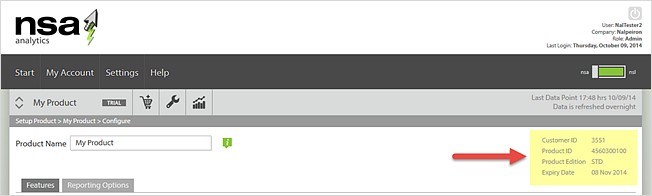
On the right of the page you will see the details you need.
Getting Started using Visual Studio
Download the example application
and open the project (.csproj) file in Visual Studio.
You will have set up a product and downloaded the Nalpeiron support library for Windows in an earlier step.
Ensure the ShaferFileChck.dll is now in your applications bin directory and move on to the next step.
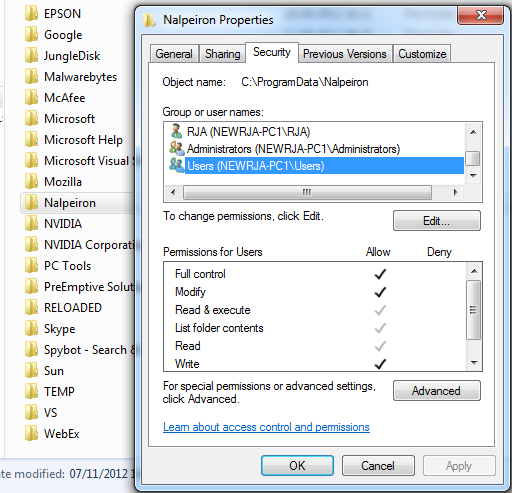
Create a directory under your common /AppData directory for your OS. Create a folder here called Nalpeiron and assign full permission for the user ‘Users’.
For your final release application this will need to be created in your application installer to allow for full permissions for all users.
Example locations for app folder:
- Windows – c:\programdata
- Previous versions of windows - C:\Documents and Settings\All Users\Application Data
Now create 2 variables (CustomerID and ProductID) which will be available to your Application Load event and set them to the values for your NSA product in your code.
To get the relevant details for your Product, go to: Setup Product > My Product > Configure.
On the right of the page you will see the details you need.
- Note these numbers down and then edit the code to include them as below. Note the use of the ProductID.
 public partial class NSAExample : Form
 {
 Shafer oShafer = new Shafer();
 string NSAUsername = "";
 int ShaferError = 0;
 int CustomerID = 3183; //**** REPLACE WITH YOUR CUSTOMERID
 int ProductID = 100; //**** REPLACE WITH YOUR PRODUCTID
 UInt32 SecurityConstantX = 100; //**** REPLACE WITH YOUR Security Constant X
 UInt32 SecurityConstantY = 600; //**** REPLACE WITH YOUR Security Constant Y
 UInt32 SecurityConstantZ = 400; //**** REPLACE WITH YOUR Security Constant Z
Setup your Application Initialise Event, please add code to call the following functions to your application start event : -
| CustomerID (Int) | Set to your Nalpeiron CustomerID. |
|---|---|
| ProductID (Int) | Set to you Nalpeiron ProductID. |
public int init(int CustomerID, int ProductID)
Example:
 private void NSAExample_Load(object sender, EventArgs e)
 {
 int LicenseStatus = 0;
 bool BadImage = false;
//Check ShaferFileChck exists
 if (!File.Exists("ShaferFilechck.dll"))
 {
 MessageBox.Show("Filechk Missing, please reinstall application");
 JustExit = true;
 this.Close();
 }
//Initialise
 ShaferError = oShafer.init(CustomerID, ProductID, SecurityConstantX, SecurityConstantY, SecurityConstantZ, ref BadImage);
Setup your ApplicationStart Logging, please add code to call the following function to your application start event : -
| Parameters | Description |
|---|---|
| Username (string) | This is the recorded username of user starting the application, if not required or available set to empty string. |
| Applanguage (string) | Set to the ISO 2 digit language code for the applications running Language. |
| Version (String) | Set to your applications Major version number. |
| Build (String) | Set to your applications Build Number. |
| Edition (String) | Set to your applications Edition. |
| LicenseStatus (String) | Set to your applications License Status. |
public int ApplicationStart(string Username, string AppLanguage, string Version, string Build, string Edition, string LicenseStatus)
Example:
ShaferError = oShafer.ApplicationStart(NSAUsername, ci.Name, thisAssembly.GetName().Version.Major.ToString(),
"ENT", thisAssembly.GetName().Version.Minor.ToString(), LicenseStatus == (int)Shafer.LicenseStatus.PROD_INTRIAL ? "Trial" : "Activated");
if (ShaferError < 0 && ShaferError != -1079 && ShaferError != -1080) // Forbidden by privacy setting
{
ShowError(ShaferError, true);
}
Setup your ApplicationEnd logging. Please add code to call the following function to your application exit event.
| Function | Parameters |
|---|---|
| ApplicationExit | NONE |
public int ApplicationEnd()
Example:
 private void NSAExample_FormClosing(object sender, FormClosingEventArgs e)
 {
 if (!JustExit)
 {
 ShaferError = oShafer.ApplicationEnd(NSAUsername);
 if (ShaferError < 0 && ShaferError != -1079 && ShaferError != -1080) // Forbidden by privacy setting
 {
 ShowError(ShaferError, false);
 }
 }
 else
 {
 Environment.Exit(0);
 }
 }
Setup your Exception Logging (if required), please add code to call the following function to your application's Global error handler.
| Function | Parameters | Description |
|---|---|---|
| Exception | Username (String) | This is the recorded username of user running the application, if not required or available set to empty string. |
| ExceptionCode (string) | This is the errorcode of the exception thrown. | |
| Description (String) | This is the description of the error thrown. |
public int Exception(string Username, string ExceptionCode, string Description)
 private void ThrowError_Click(object sender, EventArgs e)
 {
 try
 {
 throw new System.ArgumentException("NSA Example Exeception", "NSA Example Application");
 }
 catch (Exception ex)
 {
 ShaferError = oShafer.Exception(NSAUsername, System.Runtime.InteropServices.Marshal.GetExceptionCode().ToString(), ex.Message.ToString());
 if (ShaferError < 0 && ShaferError != -1079 && ShaferError != -1080) // Forbidden by privacy setting
 {
 ShowError(ShaferError, false);
 }
 }
 }
| Function | Parameters | Description |
|---|---|---|
| FeatureStart | Username (String) | This is the recorded username of user running the application, if not required or available set to empty string. |
| FeatureCode (String) | The feature code setup on the NSA server which records the required feature usage. | |
| Description (String) | This is the description of the error thrown. | |
| FeatureEnd | Username (String) | This is the recorded username of user running the application, if not required or available set to empty string. |
| FeatureCode (String) | The feature code setup on the NSA server which records the required feature usage. |
public int FeatureStart(string Username,string FeatureCode)
public int FeatureEnd(string Username,string FeatureCode)
private void feature1ToolStripMenuItem_Click(object sender, EventArgs e)
 {
 UInt32 TxnID = 0;
ShaferError = oShafer.FeatureStart(NSAUsername, "FEAT1", ref TxnID);
 if (ShaferError < 0 && ShaferError != -1079 && ShaferError != -1080) // Forbidden by privacy setting
 {
 ShowError(ShaferError, false);
 }
MessageBox.Show("Test Feature Running.");
 //DO Function Code
ShaferError = oShafer.FeatureEnd(NSAUsername, "FEAT1", TxnID);
 if (ShaferError < 0 && ShaferError != -1079 && ShaferError != -1080) // Forbidden by privacy setting
 {
 ShowError(ShaferError, false);
 }
 }
Setup your user logging, please add code to call the following functions located in the NSA.cs class in your code recording a user logon and logoff.
| Function | Parameters | Description |
|---|---|---|
| LogUserOn | Username (String) | This is the recorded username of the user logging on. |
| LogUserOff | Username (String) | This is the recorded username of the user logging off. |
public int LogUserOn(string Username)
public int LogUserOff(string Username)
Example:
private void btnLogon_Click(object sender, EventArgs e)
 {
 ShaferError = oShafer.LogUserOn(NSAUsername, ref UserLoginTxnID);
 if (ShaferError < 0 && ShaferError != -1079 && ShaferError != -1080) // Forbidden by privacy setting
 {
 ShowError(ShaferError, false);
 }
 }>private void btnLogoff_Click(object sender, EventArgs e)
 {
 ShaferError = oShafer.LogUserOff(NSAUsername, UserLoginTxnID);
 if (ShaferError < 0 && ShaferError != -1079 && ShaferError != -1080) // Forbidden by privacy setting
 {
 ShowError(ShaferError, false);
 }
 }
Build and run your application.
Mistakes to avoid
Firewall and Proxy issues
NSA/NSL sends data to Nalpeiron via a network connection to either port 80 or port 443. If you have a firewall blocking these outgoing ports your data will not reach Nalpeiron. The NSA/NSL library will recognize this fact and cache the data to disk. However, as no data has reached Nalpeiron your reports will be empty. Likewise, the same issue can be caused by a proxy server in place between your client location and Nalpeiron. NSA/NSL will utilize a proxy server but call NSAOpen (In example the encapsulating function is the init function, which contains the call) must be supplied with the proxy information (see the call NSAOpen function parameters in the Function Reference Guide).
The easiest way to make sure you have connectivity to Nalpeiron is with the call NSLTestConnection (in the example the encapsulating function is TestInternetConnection, which contains this call) function. That function will attempt to contact the Nalpeiron server. If this function fails, you have connectivity issue and, most likely, the other NSA/NSL functions will fail as well. If this is the case, you will need to Manually activate your client and your NSA data will be sent to the cache file rather than to the Nalpeiron.
NOTE : For Permanently Offline NSA/NSL applications the NSA data will never get to the server for reporting, only online NSA/NSL applications can send analytics information to the activation server for reporting. For temporarily offline NSA/NSL Application, when the application can see the activation server the cached NSA data will be sent to the activation server for reporting
End User System Info
It is important that you make a call to call NSASysInfo (in the example the encapsulating function is ApplicationStart, which contains this call) at least once per application run. NSASysInfo collects various system information that is necessary for generating reports on the Nalpeiron Analytics website. Repeated calls into call NSASysInfo will not initiate repeated connections to Nalpeiron. NSASysInfo caches the system information and sends it to Nalpeiron only when something has changed.
Download the Example Applications attached
Release Notes (Please always check the release notes for the latest updates)