
Introduction
Zentitle Webhooks enable an ISV to subscribe to events that happen in the licensing and analytics platform.
With normal web services you have to poll for changes and then process the data received to be aware and then perform a suitable action when a certain event occurs. This adds complexity and latency to the response of triggered events.
Webhooks solve these problems by letting you register a URL that will be notified by the Zentitle server anytime an event happens in your account. When the event occurs (for example, when a consumer successfully registers a product or an activation is made) Zentitle creates an event object. This object contains all the relevant information about what just happened, including the type of event and the data (in JSON format) associated with that event. Zentitle then sends the event object to the URL defined when subscribed to that event via an HTTP POST request. You can find a full list of all event types below.
Event Types
| Event Name | Description |
|---|---|
| consumerreg_trial | Fires when a client newly registers a product, or the client registration info collected has changed (via the clientside API call NSLGetLicense, Reginfo data). This event only fires when the client has a trial license. |
| consumerreg_activated | Fires when a client newly registers a product, or the client registration info collected has changed (via the clientside call API NSLGetLicense, Reginfo data). This event only fires when the client has an activated license. |
| abluser_update | Fires when an account-based licensing (ABL) user has been modified. |
| abluser_create | Fires when an account-based licensing (ABL) user has been created. |
| abluser_delete | Fires when an account-based licensing (ABL) user has been deleted. |
| product_activation | TBA |
| product_trialstart | TBA |
| More coming soon …. |
Webhook Configuration
To set up Zentitle’s Webhook’s log into the Licensing and Analytics web site, than navigate to Settings -> webservices.
Enter a Webservices/webhooks username and password. This will be used for oAuth2 authentication as shown below.
For receiving webhooks at your defined end point please make sure you exempt the webhooks endpoint from CSRF protection, otherwise they could be refused by your endpoint server.
Responding to a Webhook
To acknowledge receipt of a webhook, your endpoint should return a 2xx HTTP status code. Any other information you return in the request headers or request body will be ignored. Any response code outside the 2xx range, including 3xx codes, will indicate to Zentitle that you did not receive the webhook.
When a webhook is not successfully received for any reason, Zentitle will add the event to the failure list and will be shown in the webservices page. Here you can delete any/all of the failures, or set any/all of the failures to retry, view the response code and check the payload.

Subscribing and Authentication
All incoming webhooks API calls are authenticated using oAuth2 password grant type mechanism.
There are 2 methods for subscribing to webhooks events
-
Using a webservice call to subscribe to an event. See Webhook API below
-
Setting up a subscription in Zentitle's Licensing and Analytics web site. Navigate to settings->webservices, Then press ‘New subscription’
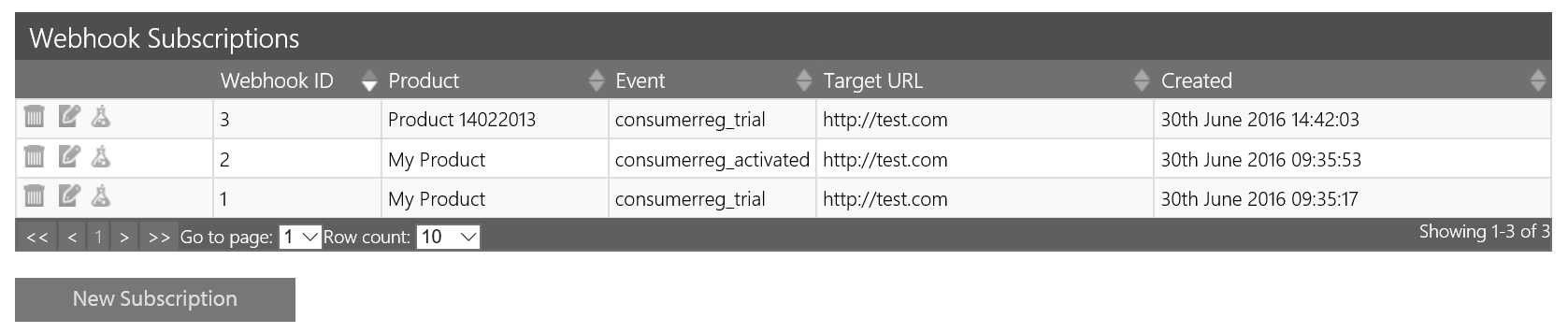
3. Select webhook event, product and enter your endpoint and hit save.
There are three actions you can perform for each webhook subscription: delete, edit and test, indicated by the trashcan, notepad and flask icons in the left-most column:
- Delete: This deletes the subscription.
- Edit: This will bring up the following popup
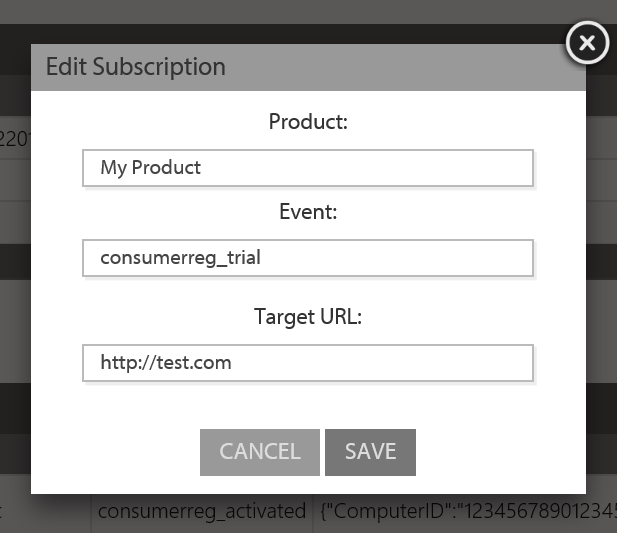
The edit pop-up enables you to edit the target URL of your subscription. The product and event fields are read-only.
- Test. This will send a test webhook for the chosen event to the designated endpoint.
You can also create a new subscription by clicking the New Subscription button below the Webhook Subscriptions table. This will bring up the following popup:
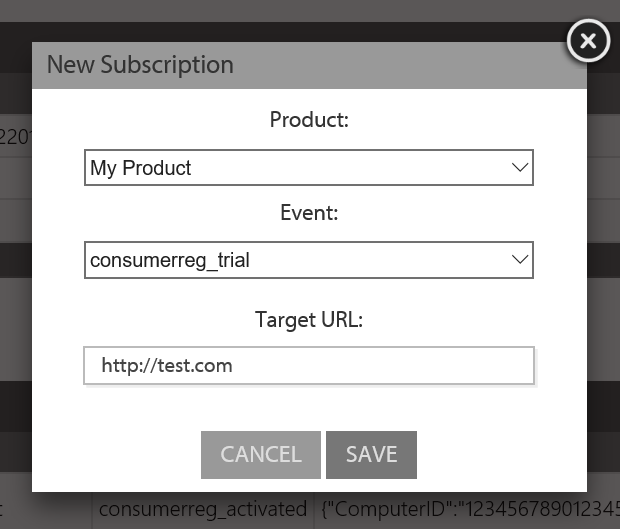
Using the dropdowns, you should select the product from your list of products and event from the list of available events. You are also required to specify the end-point in the space shown.
Webhook API
Example of Webhook Usage
-
Use oAuth2 password grant type to receive secure token (API->getsecuretoken)
-
(optional) Get product list for your account (API->hooksproduct)
-
(optional) Get Event list (API->hooks)
-
Subscribe to webhook, passing the secure token for authentication (API->hooks), passing Product and Event required for the subscription. Note only 1 subscription is allowed per product and event. (API->hooks)
-
(optional) Unsubscribe from webhook, passing subscription id (API->hooks)
Get Secure Token
POST https://my.nalpeiron.com/api/getsecuretoken
Header     - Content-Type:  application/x-www-form-urlencoded
Body     grant_type=password&
username=<webservices/webhooks username>&
password=<webservices/webhooks password>&
client_id=<Nalpeiron CustomerID>&
client_secret=<Nalpeiron Client Secret>
Call Examples
HTTP
POST /api/getsecuretoken HTTP/1.1
Host: my.nalpeiron.com
Content-Type: application/x-www-form-urlencoded
Cache-Control: no-cache
grant_type=password&username=nalptest&password=nalptest&client_id=1234&client_secret=gdkflghklsdfhklhdfskg
C#
var client = new RestClient("https://my.nalpeiron.com/api/getsecuretoken");
var request = new RestRequest(Method.POST);
request.AddHeader("cache-control", "no-cache");
request.AddHeader("content-type", "application/x-www-form-urlencoded");
request.AddParameter("application/x-www-form-urlencoded", "grant_type=password&username=nalptest&password=nalptest&client_id=1234&client_secret=gdkflghklsdfhklhdfskg", ParameterType.RequestBody);
IRestResponse response = client.Execute(request);
Response body example
{
  "access_token": "yBOzhhZSZ8KYaWgZ5L8zv7VXTn1mZrReUof-zx7_a8njrFMs2avWuC_su4AY9eWAstac0Le9kNYZ3BdaegkCffrYOaBs03P6Om7scF1ynPedJOal0aWEJc_Zw1MK8HbAorxPfjWC70jKJuAM499jFZaVb7tJPFdg3ydLEiPK8MHs1jHaM1zq9biQCWIp5Uy1Bf4dJNDhe-esWKKH5gxHukzlQZPx6RIbERjdsY1d8H3Rx2-UTPcV7uAw3qqRb5mJFiEgXK7LhSFPiSnVklhJmNLQKmvdgr4gD2QRg-Ve_ZK4O_D9hLnOo-vHA6UqRpc9",
  "token_type": "bearer",
  "expires_in": 86399,
  "refresh_token": "Y3luVFcwRFqK4mdQ32O8BBsXdcegWlP87bKn5TQFnMGtC2Y3K38TrTYp2vHtS4dnwGLQDnQVepr4AQFGTllf-RnuQn8CzkoC1hZM6aHDOqmmXV3xWWt1JWLB1CxhO_UQVg7OikWBfmcpgPxPDRY_UDU9aFfvFbhhxrlcdkye7BnQj6kqDe7iezN5V6XWDMRe6NruzEaWi0D5SpIbO4LZieaNzKl6kV4onS-cK0zPk8IvlwaQ4G-SE7EAwjfXseLwSpfOcb9-zS9-MJGQl5o5xYzo-K9d3GKj7NMzfA7eRmP_Tab3IfUCZgQ-tUnBb4Ql"
}
The access token is used in subsequent calls, to authorize the request and must be passed in the header. If the access token is invalid i.e. has expired, you will need to call getsecure token again to create a new secure token for subsequent calls. Access tokens life-span is 1 day and then becomes invalid.
Get Product List
GET https://my.nalpeiron.com/api/hooksproduct
Header Content-Type:  application/x-www-form-urlencoded
Authorization: Bearer <Access Token>
Body
Call Examples
HTTP
GET /api/hooksproduct HTTP/1.1
Host: my.nalpeiron.com
Content-Type: application/x-www-form-urlencoded
Authorization: Bearer yBOzhhZSZ8KYaWgZ5L8zv7VXTn1mZrReUof-zx7_a8njrFMs2avWuC_su4AY9eWAstac0Le9kNYZ3BdaegkCffrYOaBs03P6Om7scF1ynPedJOal0aWEJc_Zw1MK8HbAorxPfjWC70jKJuAM499jFZaVb7tJPFdg3ydLEiPK8MHs1jHaM1zq9biQCWIp5Uy1Bf4dJNDhe-esWKKH5gxHukzlQZPx6RIbERjdsY1d8H3Rx2-UTPcV7uAw3qqRb5mJFiEgXK7LhSFPiSnVklhJmNLQKmvdgr4gD2QRg-Ve_ZK4O_D9hLnOo-vHA6UqRpc9
Cache-Control: no-cache
C#
var client = new RestClient("https://my.nalpeiron.com/api/hooksproduct");
var request = new RestRequest(Method.GET);
request.AddHeader("cache-control", "no-cache");
request.AddHeader("authorization", "Bearer yBOzhhZSZ8KYaWgZ5L8zv7VXTn1mZrReUof-zx7_a8njrFMs2avWuC_su4AY9eWAstac0Le9kNYZ3BdaegkCffrYOaBs03P6Om7scF1ynPedJOal0aWEJc_Zw1MK8HbAorxPfjWC70jKJuAM499jFZaVb7tJPFdg3ydLEiPK8MHs1jHaM1zq9biQCWIp5Uy1Bf4dJNDhe-esWKKH5gxHukzlQZPx6RIbERjdsY1d8H3Rx2-UTPcV7uAw3qqRb5mJFiEgXK7LhSFPiSnVklhJmNLQKmvdgr4gD2QRg-Ve_ZK4O_D9hLnOo-vHA6UqRpc9");
request.AddHeader("content-type", "application/x-www-form-urlencoded");
IRestResponse response = client.Execute(request);
Response body example
[
  {
   "productID": "1234567890",
   "name": "My Product"
 },
 {
   "productID": "1234567891",
   "name": "Test Product 2"
 }
]
The returned productid is used in calls to subscribe to identify the product for the event subscription.
Get Event List
GET https://my.nalpeiron.com/api/hooks
Header Content-Type:  application/x-www-form-urlencoded
Authorization: Bearer <Access Token>
Body
Call Examples
HTTP
GET /api/hooks HTTP/1.1
Host: my.nalpeiron.com
Content-Type: application/x-www-form-urlencoded
Authorization: Bearer yBOzhhZSZ8KYaWgZ5L8zv7VXTn1mZrReUof-zx7_a8njrFMs2avWuC_su4AY9eWAstac0Le9kNYZ3BdaegkCffrYOaBs03P6Om7scF1ynPedJOal0aWEJc_Zw1MK8HbAorxPfjWC70jKJuAM499jFZaVb7tJPFdg3ydLEiPK8MHs1jHaM1zq9biQCWIp5Uy1Bf4dJNDhe-esWKKH5gxHukzlQZPx6RIbERjdsY1d8H3Rx2-UTPcV7uAw3qqRb5mJFiEgXK7LhSFPiSnVklhJmNLQKmvdgr4gD2QRg-Ve_ZK4O_D9hLnOo-vHA6UqRpc9
Cache-Control: no-cache
C#
var client = new RestClient("https://my.nalpeiron.com/api/hooks");
var request = new RestRequest(Method.GET);
request.AddHeader("cache-control", "no-cache");
request.AddHeader("authorization", "Bearer yBOzhhZSZ8KYaWgZ5L8zv7VXTn1mZrReUof-zx7_a8njrFMs2avWuC_su4AY9eWAstac0Le9kNYZ3BdaegkCffrYOaBs03P6Om7scF1ynPedJOal0aWEJc_Zw1MK8HbAorxPfjWC70jKJuAM499jFZaVb7tJPFdg3ydLEiPK8MHs1jHaM1zq9biQCWIp5Uy1Bf4dJNDhe-esWKKH5gxHukzlQZPx6RIbERjdsY1d8H3Rx2-UTPcV7uAw3qqRb5mJFiEgXK7LhSFPiSnVklhJmNLQKmvdgr4gD2QRg-Ve_ZK4O_D9hLnOo-vHA6UqRpc9");
request.AddHeader("content-type", "application/x-www-form-urlencoded");
IRestResponse response = client.Execute(request);
Response body example
[
  "consumerreg_trial",
  "consumerreg_activated"
]
Subscribe
POST https://my.nalpeiron.com/api/hooks
Header Content-Type:  application/json
Authorization: Bearer <Access Token>
Body     { "target_url" : "<your endpoint to receive the post>", "event" : "<eventname>", "productid":"<productID>"}
Call Examples
HTTP
POST /api/hooks HTTP/1.1
Host: my.nalpeiron.com
Authorization: Bearer yBOzhhZSZ8KYaWgZ5L8zv7VXTn1mZrReUof-zx7_a8njrFMs2avWuC_su4AY9eWAstac0Le9kNYZ3BdaegkCffrYOaBs03P6Om7scF1ynPedJOal0aWEJc_Zw1MK8HbAorxPfjWC70jKJuAM499jFZaVb7tJPFdg3ydLEiPK8MHs1jHaM1zq9biQCWIp5Uy1Bf4dJNDhe-esWKKH5gxHukzlQZPx6RIbERjdsY1d8H3Rx2-UTPcV7uAw3qqRb5mJFiEgXK7LhSFPiSnVklhJmNLQKmvdgr4gD2QRg-Ve_ZK4O_D9hLnOo-vHA6UqRpc9
Content-Type: application/json
Cache-Control: no-cache
{ "target_url" : "https://test.com", "event" : "consumerreg_trial", "productid":"1234567890"}
C#
var client = new RestClient("https://my.nalpeiron.com/api/hooks");
var request = new RestRequest(Method.POST);
request.AddHeader("cache-control", "no-cache");
request.AddHeader("content-type", "application/json");
request.AddHeader("authorization", "Bearer yBOzhhZSZ8KYaWgZ5L8zv7VXTn1mZrReUof-zx7_a8njrFMs2avWuC_su4AY9eWAstac0Le9kNYZ3BdaegkCffrYOaBs03P6Om7scF1ynPedJOal0aWEJc_Zw1MK8HbAorxPfjWC70jKJuAM499jFZaVb7tJPFdg3ydLEiPK8MHs1jHaM1zq9biQCWIp5Uy1Bf4dJNDhe-esWKKH5gxHukzlQZPx6RIbERjdsY1d8H3Rx2-UTPcV7uAw3qqRb5mJFiEgXK7LhSFPiSnVklhJmNLQKmvdgr4gD2QRg-Ve_ZK4O_D9hLnOo-vHA6UqRpc9");
request.AddParameter("application/json", "{ \"target_url\" : \"http://test.com\", \"event\" : \"consumerreg_trial\", \"productid\":\"1234567890\"}", ParameterType.RequestBody);
IRestResponse response = client.Execute(request);
Response body example
On successful subscription, the returned id is the subscription id, which is used as a parameter to unsubscribe from this subscription.
{
  "message": "OK",
  "id": 1005
}
Unsubscribe
DELETE https://my.nalpeiron.com/api/hooks?id=<subscriptionid>
Header Content-Type:  application/json
Authorization: Bearer <Access Token>
Call Examples
HTTP
DELETE /api/hooks?id=2 HTTP/1.1
Host: my.nalpeiron.com
Authorization: Bearer yBOzhhZSZ8KYaWgZ5L8zv7VXTn1mZrReUof-zx7_a8njrFMs2avWuC_su4AY9eWAstac0Le9kNYZ3BdaegkCffrYOaBs03P6Om7scF1ynPedJOal0aWEJc_Zw1MK8HbAorxPfjWC70jKJuAM499jFZaVb7tJPFdg3ydLEiPK8MHs1jHaM1zq9biQCWIp5Uy1Bf4dJNDhe-esWKKH5gxHukzlQZPx6RIbERjdsY1d8H3Rx2-UTPcV7uAw3qqRb5mJFiEgXK7LhSFPiSnVklhJmNLQKmvdgr4gD2QRg-Ve_ZK4O_D9hLnOo-vHA6UqRpc9
Content-Type: application/json
Cache-Control: no-cache
C#
var client = new RestClient("https://my.nalpeiron.com/api/hooks?id=2");
var request = new RestRequest(Method.DELETE);
request.AddHeader("cache-control", "no-cache");
request.AddHeader("content-type", "application/json");
request.AddHeader("authorization", "Bearer yBOzhhZSZ8KYaWgZ5L8zv7VXTn1mZrReUof-zx7_a8njrFMs2avWuC_su4AY9eWAstac0Le9kNYZ3BdaegkCffrYOaBs03P6Om7scF1ynPedJOal0aWEJc_Zw1MK8HbAorxPfjWC70jKJuAM499jFZaVb7tJPFdg3ydLEiPK8MHs1jHaM1zq9biQCWIp5Uy1Bf4dJNDhe-esWKKH5gxHukzlQZPx6RIbERjdsY1d8H3Rx2-UTPcV7uAw3qqRb5mJFiEgXK7LhSFPiSnVklhJmNLQKmvdgr4gD2QRg-Ve_ZK4O_D9hLnOo-vHA6UqRpc9");
IRestResponse response = client.Execute(request);
Events
consumerreg_trial
Fires when a client newly registers a product, or the client registration info collected has changed (Via the clientside API call NSLGetLicense, Reginfo data). This event only fires when the client has a trial license.
Example Payload
{"ComputerID":"12345678901234567890","LicenseCode":"LC100000001","Firstname":"Joe","Lastname":Bloggs","Company":"Nalpeiron Ltd","Email":"jb@yahoo.co.uk"}
consumerreg_activated
Fires when a client newly registers a product, or the client registration info collected has changed (Via the clientside call API NSLGetLicense, Reginfo data). This event only fires when the client has an activated license.
Example Payload
{"ComputerID":"12345678901234567890","LicenseCode":"LC100000001","Firstname":"Joe","Lastname":"Bloggs","Company":"Nalpeiron Ltd","Email":"jb@yahoo.co.uk"}
abluser_update
Fires when an ABL user is updated.
Example Payload
{ "username": "user_test", "password" : "user_test", "firstname" : "Joe", "lastname" : "Bloggs", "email" : "jb@yahoo.co.uk", "telephone" : "512.999.9099", "additional" : ""}
abluser_create
Fires when an ABL user is created.
Example Payload
{ "username": "user_test", "password" : "user_test", "firstname" : "WS First", "Joe" : "Bloggs", "email" : "jb@yahoo.co.uk", "telephone" : "", "additional" : ""}
abluser_delete
Fires when an ABL user is deleted.
Example Payload
{ "username": "user_test"}
product_activation
TBA
product_trialstart
TBA