
Introduction
A consumption token pool is a resource which can be associated with a license code. It is a class of feature whereby a number of multipurpose 'tokens' may be associated with the code. These tokens can represent a finite resource that may be apportioned to the set of instances of a client application associated with this license code, with the maximum number of tokens for this code being pre-determined.
Each client instance may 'check-out' a number of tokens subject to the condition that the total number of tokens checked does not exceed the maximum number of tokens associated with the license code. This total number can be set on a code-by-code basis or set globally for a license code profile. In this respect, they are similar to element pools. There is are, however, one crucial difference. This is that they can be consumed, i.e. irreversibly destroyed (and so cannot be checked back in.) As such, they may form a suitable basis for the implementation of:
- Any non-conserved resource such as fuel, food etc.
- Any activity which may be performed a limited number of times (with the number of tokens decremented each time.)
- Any pre-paid resource whose amount 'runs down' and maybe 'topped-up'.
Consumption tokens are managed by the Zentitle activation server. As such, they are only suitable for online licensing where the client machines refresh their licenses from our server at regular intervals.
Dashboard Consumption Token Management
Setting up a Consumption Token Feature
A consumption token feature can be created and assigned to a license code (or profile) in a similar manner to that of other feature types. The first step is to go to your product's Configure page from the main menu:
On arriving at the Configure page, click the Show Advanced Options button and click the Features tab. This will show you a tree representation of your existing features and also an Add Feature button.
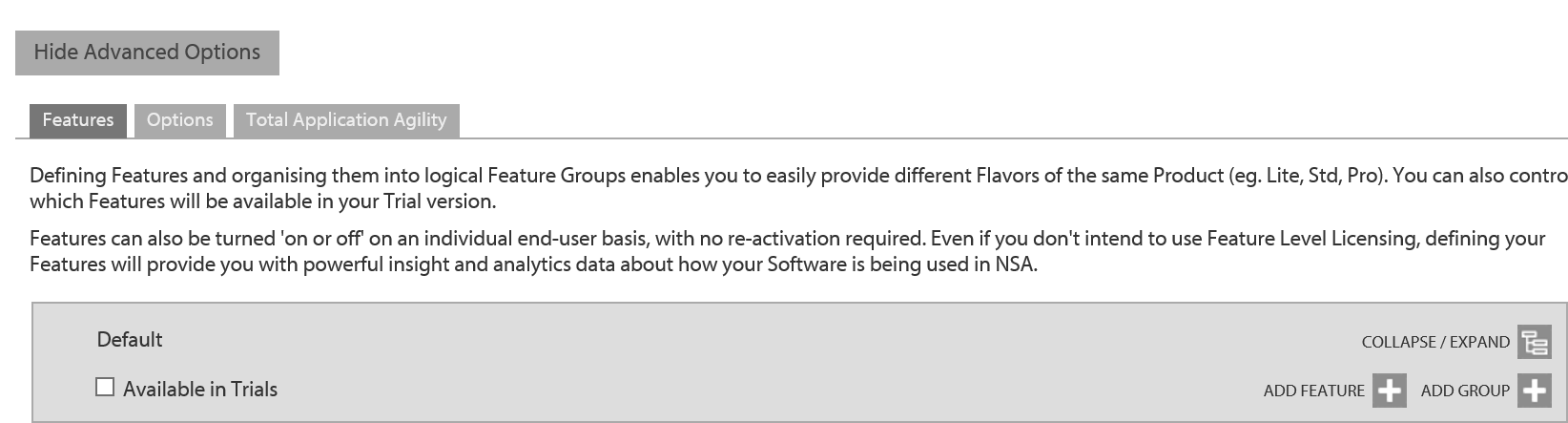
Clicking this button will bring up the Add/Edit Feature dialog as shown below.
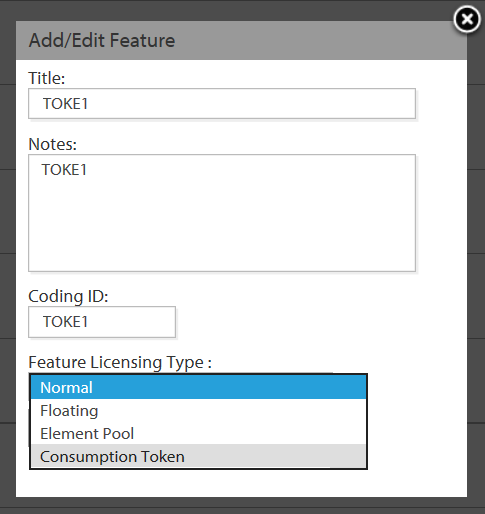
To define a consumption token, simply give your feature a title, add some notes and a 5 character Coding ID. Select the Feature Licensing Type to be consumption token to complete the definition.
Consumption Tokens and Profiles
Having defined a consumption token, you may now wish to associate it with a license code profile. To do so, go to the Code Profiles page from the main menu as shown.
Clicking Edit button next to the profile you wish to select will take you to the Edit Profile page for this profile. On this page you will see a Features tab. Clicking this will display the features tree, incorporating your newly-defined consumption token, for the current product.
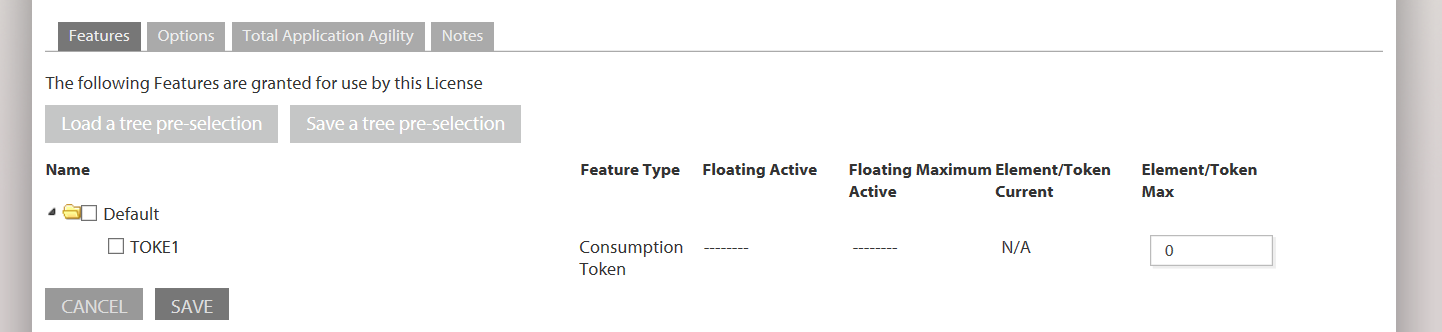
Here you have the opportunity to define the total number of tokens that is associated with a license code belonging to this profile. Simple enter this number into the Element/Token Max textbox and click Save.
Consumption Tokens and License Codes
Alternatively, you can assign consumption tokens to an individual license code. To do this, select the View and Manage Codes page from the main menu as shown.
On the view and Manage Codes page, click the Edit Code button next to the license code you wish to work with. This will take you to that license code's Edit Code page.
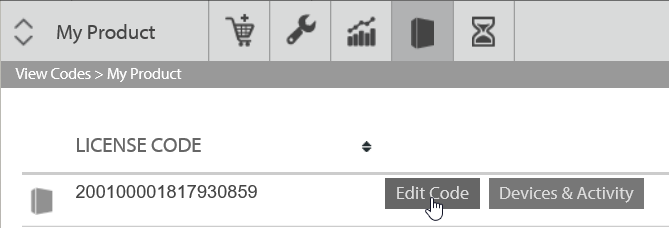
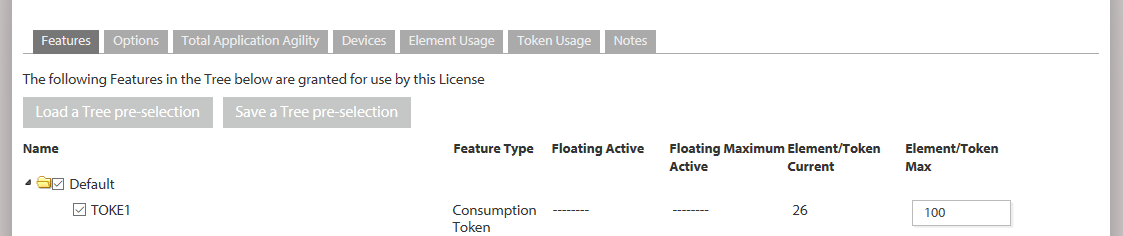
On the Edit Code page, click the Features tab to see the feature tree for your product. For consumption tokens, there are two columns of particular interest:
- Element/Token Current: This is the number of tokens currently checked out for this pool with this license code.
- Element/Token Max: This is the total number of tokens in this pool for this license code. You can set a specific value for this code by editing the value in the textbox.
Tracking Token Usage
The Token Usage tab provides the following information about the current and historical usage of consumption tokens for the chosen license code:
- Current usage of all consumption tokens by all devices activated with this license code.
- A historical record of all token transactions for all consumption tokens for this license code.
These are shown in two tables: Current Token Usage by Device and Token Usage history, shown below.
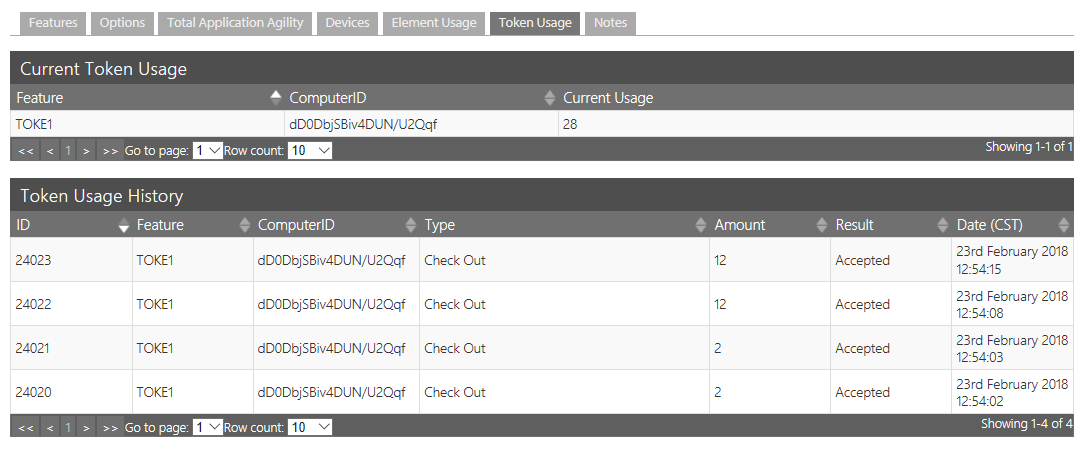
The Current Token Usage by Device table has a row entry for each consumption token and device, with the following columns:
- Feature: The unique ID of the consumption token pool which should be a max. 5 character alphabetic string.
- ComputerID: The unique ID of each device with tokens checked out.
- Current Usage: The number of tokens of the specified pool currently checked out by the specified device.
The Token Usage History table maintains a record of all consumption token transactions (checkin/out) for the selected license code, and has the following columns:
- ID: A unique ID for each transaction.
- Feature: The unique ID of the consumption token pool which should be a max. 5 character alphabetic string.
- ComputerID: The unique ID of each device with tokens checked out.
- Type: Transaction type, with one possible value 'Check out'.
- Amount: Number of tokens involved in the transaction.
- Result: Whether the transaction was 'Accepted' or 'Refused'
- Date: Date and time (UTC) of the transaction.
Consumption of tokens is a client-side only operation (see below for details.) The Zentitle licensing server is not informed when tokens are actually consumed. It is only informed when tokens are checked out.
Client-Side consumption token Management
C API
A client application can make use of consumption tokens using the C API calls described in the following table:
| Function | Parameters | Description |
|---|---|---|
|
int NSLCheckoutTokens(const char * tokenName, uint32_t tokenAmt, int32_t * tokenStatus, const char * licenseNo) |
tokenName: a NULL terminated, UTF-8 encoded string containing the five (5) character code of the token pool to be drawn from. tokenAmt: the number of tokens to withdraw from the pool tokenStatus: the status of the pool (FEATSTATUS) licenseNo: the license number of the current, valid system license |
Withdraws a specified number of tokens from a token pool on the Zentitle server. |
|
int NSLConsumeTokens(const char * tokenName, uint32_t tokenAmt, const char * licenseNo) |
tokenName: a NULL terminated, UTF-8 encoded string containing the five (5) character code of the token pool to be drawn from. tokenAmt: the number of tokens to be consumed (ie removed from locally held pool). licenseNo: the license number of the current, valid system license |
Consumes the indicated number of tokens. The number of locally held tokens (as obtained via NSLCheckoutTokens) will be decremented by the indicated amount. NOTE locally held tokens CANNOT be returned to the server. Locally held tokens will be LOST if the license file is deleted.
|
|
int NSLGetTokenInfo (const char * tokenName, uint32_t * tokenMax, uint32_t * tokenAmt, int32_t * tokenStatus ) |
tokenName: a NULL terminated, UTF-8 encoded string containing the five (5) character code of the token pool to be drawn from. tokenMax: the maximum number of tokens in the pool. If the caller does not have access to the pool, the return value will be 0. tokenAmt: the number of unconsumed tokens checked out to current system. tokenStatus: the status of the token pool (FEATSTATUS) |
Get the number of tokens current checked out along with the status of a token pool. |
| int NSLReturnTokens (const char * poolName, uint32_t poolAmt, const char * authentication )
|
poolName: a NULL terminated, UTF-8 encoded string containing the five (5) character pool code of the pool to be drawn from. poolAmt: the number of tokens to return to the pool. authentication: the license number or username (ABL) of the current, valid system license |
Returns a specified number of unconsumed tokens to an token pool |
Pool Status Codes
| Value | Description |
|---|---|
| 1 | Request Authorized |
| 0 | Unset |
| -1 | Error |
| -2 | Unknown consumption token |
| -3 | Request Denied |
| -4 | Resource Not Authorized for Use |
| -5 | License Expired |
C# Example Code
The above three functions are contained in the ShaferFileChck.dll module (or its equivalent in Linux, MacOS and other platforms) and can, in a .NET environment, be invoked by making a suitable invocation of the function and using a suitable wrapper. The table below provides example code which accomplishes this in C#.
| Function | Invocation | Wrapper |
|---|---|---|
| NSLCheckoutTokens |
[DllImport("ShaferFilechck.dll", CallingConvention = CallingConvention.Cdecl)] public static extern int NSLCheckoutTokens(byte[] tokenName, UInt32 tokenAmt, ref int tokenStatus, byte[] licenseNo); |
public int CheckoutTokens(string Tokenname, UInt32 NumToCheckOut, ref int status, string LicenseCode) { int ReturnValue = 0; // Convert strings to byte arrays for Unicode compatibility byte[] UTFLicenseCode = Encoding.UTF8.GetBytes(LicenseCode == null ? "" : LicenseCode); byte[] UTFTokenname = Encoding.UTF8.GetBytes(Tokenname == null ? "" : Tokenname); ReturnValue = NSLCheckoutTokens(UTFTokenname, NumToCheckOut, ref status, LicenseCode == "" ? null : UTFLicenseCode); ReturnValue -= (int)SecurityOffset; return ReturnValue; } |
| NSLConsumeTokens |
[DllImport("ShaferFilechck.dll", CallingConvention = CallingConvention.Cdecl)] public static extern int NSLConsumeTokens(byte[] tokenName, UInt32 tokenAmt, byte[] licenseNo); |
public int ConsumeTokens(string Tokenname, UInt32 NumToCheckOut, ref int status, string LicenseCode) { int ReturnValue = 0; // Convert strings to byte arrays for Unicode compatibility byte[] UTFLicenseCode = Encoding.UTF8.GetBytes(LicenseCode == null ? "" : LicenseCode); byte[] UTFTokenname = Encoding.UTF8.GetBytes(Tokenname == null ? "" : Tokenname); ReturnValue = NSLConsumeTokens(UTFTokenname, NumToCheckOut, LicenseCode == "" ? null : UTFLicenseCode); ReturnValue -= (int)SecurityOffset; return ReturnValue; } |
| NSLGetTokenInfo |
[DllImport("ShaferFilechck.dll", CallingConvention = CallingConvention.Cdecl)] public static extern int NSLGetTokenInfo(byte[] tokenName, ref UInt32 tokenMax, ref UInt32 tokenAmt, ref Int32 tokenStatus); |
public int GetTokenInfo(string Tokenname, ref UInt32 TokenMax, ref UInt32 TokenAmt, ref int TokenStatus) { int ReturnValue = 0; // Convert strings to byte arrays for Unicode compatibility byte[] UTFTokenname = Encoding.UTF8.GetBytes(Tokenname == null ? "" : Tokenname); ReturnValue = NSLGetTokenInfo(UTFTokenname, ref TokenMax, ref TokenAmt, ref TokenStatus); ReturnValue -= (int)SecurityOffset; return ReturnValue; } |
| NSLReturnTokens |
[DllImport("ShaferFilechck.dll", CallingConvention = CallingConvention.Cdecl)] |
public int CheckinTokens(string Poolname, UInt32 NumToCheckIn, string LicenseCode) |
VB.NET Example Code
The table below provides example code which accomplishes the same as the above in VB.NET.
| Function | Invocation | Wrapper |
|---|---|---|
| NSLCheckoutTokens |
<DllImport("ShaferFilechck.dll", CallingConvention:=CallingConvention.Cdecl)> Public Shared Function NSLCheckoutTokens(ByVal tokenName As Byte(), ByVal tokenAmt As UInt32, ByRef tokenStatus As Integer, ByVal licenseNo As Byte()) As Integer End Function |
Public Function CheckoutTokens(ByVal Tokenname As String, ByVal NumToCheckOut As UInt32, ByRef status As Integer, ByVal LicenseCode As String) As Integer Dim ReturnValue As Integer = 0 Dim UTFLicenseCode As Byte() = Encoding.UTF8.GetBytes(If(LicenseCode Is Nothing, "", LicenseCode)) Dim UTFTokenname As Byte() = Encoding.UTF8.GetBytes(If(Tokenname Is Nothing, "", Tokenname)) ReturnValue = NSLCheckoutTokens(UTFTokenname, NumToCheckOut, status, If(LicenseCode = "", Nothing, UTFLicenseCode)) ReturnValue -= CInt(SecurityOffset) Return ReturnValue End Function |
| NSLConsumeTokens |
<DllImport("ShaferFilechck.dll", CallingConvention:=CallingConvention.Cdecl)> Public Shared Function NSLConsumeTokens(ByVal tokenName As Byte(), ByVal tokenAmt As UInt32, ByVal licenseNo As Byte()) As Integer End Function |
public int ConsumeTokens(string Tokenname, UInt32 NumToCheckOut, ref int status, string LicenseCode) { int ReturnValue = 0; // Convert strings to byte arrays for Unicode compatibility byte[] UTFLicenseCode = Encoding.UTF8.GetBytes(LicenseCode == null ? "" : LicenseCode); byte[] UTFTokenname = Encoding.UTF8.GetBytes(Tokenname == null ? "" : Tokenname); ReturnValue = NSLConsumeTokens(UTFTokenname, NumToCheckOut, LicenseCode == "" ? null : UTFLicenseCode); ReturnValue -= (int)SecurityOffset; return ReturnValue; } |
| NSLGetTokenInfo |
<DllImport("ShaferFilechck.dll", CallingConvention:=CallingConvention.Cdecl)> Public Shared Function NSLGetTokenInfo(ByVal tokenName As Byte(), ByRef tokenMax As UInt32, ByRef tokenAmt As UInt32, ByRef tokenStatus As Int32) As Integer End Function |
public int GetTokenInfo(string Tokenname, ref UInt32 TokenMax, ref UInt32 TokenAmt, ref int TokenStatus) { int ReturnValue = 0; // Convert strings to byte arrays for Unicode compatibility byte[] UTFTokenname = Encoding.UTF8.GetBytes(Tokenname == null ? "" : Tokenname); ReturnValue = NSLGetTokenInfo(UTFTokenname, ref TokenMax, ref TokenAmt, ref TokenStatus); ReturnValue -= (int)SecurityOffset; return ReturnValue; } |
| NSLReturnTokens |
<DllImport("ShaferFilechck.dll", CallingConvention:=CallingConvention.Cdecl)> Public Shared Function NSLReturnTokens(ByVal tokenName As Byte(), ByVal tokenAmt As UInt32, ByVal licenseNo As Byte()) As Integer End Function |
Public Function CheckinTokens(ByVal Tokenname As String, ByVal NumToCheckIn As UInt32, ByVal LicenseCode As String) As Integer Dim ReturnValue As Integer = 0 Dim UTFLicenseCode As Byte() = Encoding.UTF8.GetBytes(If(LicenseCode Is Nothing, "", LicenseCode)) Dim UTFTokenname As Byte() = Encoding.UTF8.GetBytes(If(Tokenname Is Nothing, "", Tokenname)) ReturnValue = NSLReturnTokens(UTFTokenname, NumToCheckIn, If(LicenseCode = "", Nothing, UTFLicenseCode)) ReturnValue -= CInt(SecurityOffset) Return ReturnValue End Function |