
Introduction
One of the hardest things to do in licensing is to manage both a perpetual license alongside a variable maintenance period.You want to control who gets what upgrade and feature based on their maintenance "state" and now that's easy with Zentitle.
Now you can allow those with a current maintenance agreement to update (or upgrade) and encourage those who need to renew to do so before allowing them these benefits. You can also make these changes on the fly, so once your back-end system reports a paid up maintenance contract you can instantly change the state of the user's license to "enable" the features or upgrades that are applicable, no user interaction.
How to set "maintenance" controls with your licensing
There are only a few simple things to do to get a fully automated licensing and maintenance program working with Zentitle.Set up a license code (or profile) for maintenance
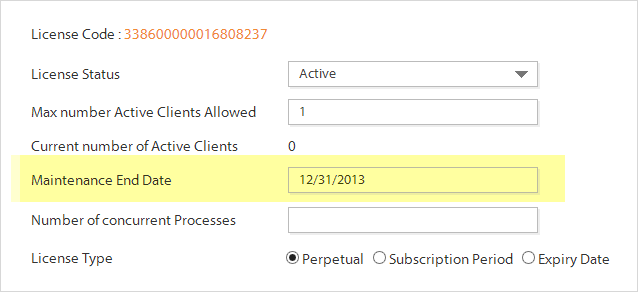
Zentitle has a special setting within every license you can set either manually or with Web Services from your own systems. This is called the "maintenance end date" and is a secondary licensing "clock" allowing you to count down to the renewal date for each customer. This date can be whatever time in the future you wish and is then used outside the normal license parameters to alert the end user to "renew" their maintenance and then to control their permissions based on their maintenance status.
So this means you can have a license type working alongside the maintenance, so for example you can have a perpetual license that never expires after purchase/activation using the standard licensing process working alongside the renewal process. The renewal process will control other non-license privileges such as the ability to upgrade, update or get special features or services you offer.
This two phase process is what makes it easy for you to control differing processes in your software, so in most cases you can now separate these into a license based on/off function like the ability to run your core application and have the process associated with your updating mechanism run separately based on the "maintenance end date" in the same license code from Zentitle.
Push "maintenance" data and marketing offers to the user at renewal time
You can then add in some other useful functionality making use of another unique function from Zentitle: Total Application Agility (TAA). Using TAA you can add in more useful data for easing the renewal process such as text explaining the options for the user that can be displayed as the renewal counts down e.g. 30 days from the renewal date (set in maintenance end date field) you pop up a dialog making a renewal special offer. This is pushed from the same license code using user defined fields containing data you have pre-populated from your own systems.
In addition, in TAA you can add in a URL for the user to buy a renewal, and the same idea applies to other data you may have on this Customer or their Maintenance status, all this data can be pushed to the "client" based on the renewal date to maximize the renewal rate and to make life easy for the user.
If they don't renew then you can restrict the functionality they only get as a user under maintenance date, and to keep marketing them after the end date, plus you can "instantly" switch on functionality after the payment has been received into your back end systems using web services. You can even "kill" a license if they don't renew if that's your model.
Coding your application
Zentitle code examples all have this set of example calls in them so you can see to use it in your application.
The basic calls for maintenance controls are:
NSLGetMaintExpsec - seconds from expiry
NSLGetMaintExpDate - date of expiry
Make a call (every hour or regularly to ensure you don't miss the trigger date for a renewal) to these functions to check the date and make the appropriate changes in your own code based on your own rules for maintenance. When the time comes you can also push down the extra data from TAA as outlined below.
If you have a separate "updating" process to your core application code you simply need to have that application call the licensing DLL instead and that can function separately to the core code without a problem.
To add in TAA fields and functionality check this article
The Maintenance Date is a date field that is available on the client side via an API call, you can use this date as you see fit.
If it expires it doesn’t effect the license at all, so we see it main purpose is to specify a manetenance date that can be shown to the customer and then you can code what happens if this date expires as to fit your licensing requirements.
FAQ on Maintenance Usage
Q: Can Maintenance end date apply to perpetual,subscription, and end date?A: Yes
Q: If that is the case what happens when you have maintenance and a subscription type license.
A: If the subscription period expires then the license will also, the maintenance date has no effect on the license unless you code it to take an effect